
Typing a whole paragraph in capitals by accident is annoying, and the fix is simple: turn on Toggle Keys to hear Caps Lock in Windows 11. Once enabled, Windows plays a short tone every time Caps Lock, Num Lock, or Scroll Lock changes state. The feature is built into every edition of Windows 11, and no administrator rights are needed.
Key Takeaways
- Toggle Keys plays a sound whenever Caps Lock, Num Lock, or Scroll Lock is pressed.
- The quickest route is Settings > Accessibility > Keyboard > Toggle keys.
- Holding the Num Lock key for 5 seconds is a handy shortcut.
- A high-pitched tone means the key is on, and a low-pitched tone means it is off.
- The setting can be switched off again at any time from the same page.
Step-by-Step Guide to Turn On Toggle Keys to Hear Caps Lock
Method 1: Use the Settings App
This is the easiest method for most people, and it works the same on a desktop, a laptop, or a shared family PC.
-
- Press Windows + I to open Settings.
- Select Accessibility from the left sidebar.
- Scroll down to the Interaction section and click Keyboard.
- Find the Toggle keys option, which describes playing a sound when Caps Lock, Num Lock, or Scroll Lock is pressed.
- Switch the Toggle keys toggle to On.
- Press the Caps Lock key to test it.
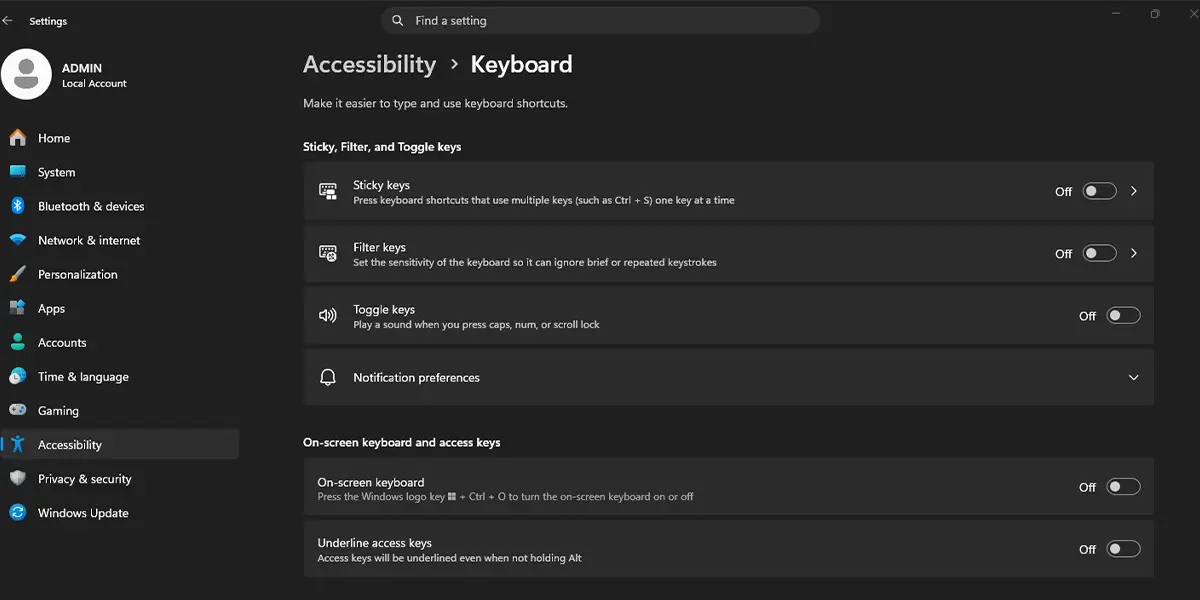
A short, high-pitched beep plays when Caps Lock turns on, and a lower beep plays when it turns off. That confirms the change worked.
Tip: Click the arrow on the Toggle keys row to expand it. A checkbox for the keyboard shortcut appears there, which lets the Num Lock shortcut work later.
Method 2: Use the Control Panel
The older Control Panel still includes the same option, which suits anyone who prefers the classic layout.
-
-
- Press the Windows key, type Control Panel, and press Enter.
- Set View by to Large icons or Small icons.
- Click Ease of Access Center.
- Click Make the keyboard easier to use.
- Tick the Turn on Toggle Keys checkbox.
- Click Apply, then click OK.
-
Pressing Caps Lock now produces the same tone as in Method 1.
Method 3: Use the Keyboard Shortcut
This works best when a quick switch is needed without opening any menus, such as on a work laptop mid-task.
-
-
- Press and hold the Num Lock key for 5 seconds.
- Wait for the Toggle Keys prompt to appear.
- Click Yes to turn the feature on.
-
Tip: Some compact laptops have no dedicated Num Lock key. On those machines, the Settings method is the more reliable choice.
How to Undo or Reverse This Change
If the beeps become distracting, go back to Settings > Accessibility > Keyboard and switch the Toggle keys toggle to Off. The tones stop right away. Anyone who used the Control Panel method can untick Turn on Toggle Keys in the Ease of Access Center instead.
Common Problems and Fixes
No Sound Plays After Turning On Toggle Keys
The tones play through the default audio output, so a muted PC, a low volume level, or the wrong output device will hide them. Check the volume icon in the taskbar, unmute the PC, and confirm the right speakers or headphones are selected. Then press Caps Lock again.
The Num Lock Shortcut Does Nothing
The shortcut only responds when it is enabled. Open Settings > Accessibility > Keyboard, expand the Toggle keys row, and tick the checkbox for the keyboard shortcut. Hold Num Lock for 5 seconds again afterward.
The Toggle Keys Option Is Missing or Greyed Out
A work or school PC may have accessibility settings controlled by an administrator. In that case, the organization’s IT team would need to allow the change. On a personal computer, restart the PC and open the page again.
Frequently Asked Questions
Does Toggle Keys work on Windows 11 Home?
Yes. Toggle Keys is an accessibility feature included in every edition of Windows 11, including Home and Pro.
Which keys does Toggle Keys make a sound for?
The feature covers Caps Lock, Num Lock, and Scroll Lock. Each one plays a tone when it is switched on or off.
How can a person tell whether Caps Lock is on or off by sound?
A high-pitched tone signals that the key has been turned on. A low-pitched tone signals that it has been turned off.
Does Toggle Keys need a restart?
No. The setting takes effect immediately, so pressing Caps Lock right after enabling it is enough to test it.
Is administrator access required?
No. A standard user account can turn on Toggle Keys through Settings, the Control Panel, or the shortcut.
Can Toggle Keys be turned on with a keyboard shortcut?
Yes. Hold the Num Lock key for 5 seconds and choose Yes when the prompt appears. The shortcut must be enabled under Settings > Accessibility > Keyboard > Toggle keys.
Does Toggle Keys slow down the computer or drain the battery?
No noticeable impact is expected. The feature only plays a brief tone when a lock key is pressed.
Will the setting stay on after the PC restarts?
Yes. Once enabled, Toggle Keys stays on until it is switched off manually from Settings or the Control Panel.