
Setting up a Yahoo Mail account in the Outlook mobile app takes just a few taps once the right menu is found. This guide walks through the fastest route on both iOS and Android, so Yahoo messages, contacts, and calendar events show up right alongside everything else.
Key Takeaways
- The Outlook mobile app supports Yahoo Mail as a standard email account type – no extra app needed.
- Adding the account requires only a Yahoo email address and password.
- Two-step verification users need an app password instead of their regular password.
- The whole setup typically takes under two minutes.
- Yahoo mail, contacts, and calendar sync automatically once the account connects.
How to Add a Yahoo Mail Account in the Outlook Mobile App
Step-by-Step Instructions
- Step 1: Open the Outlook app on the phone or tablet. If this is the very first account being added, the app jumps straight to the sign-in screen. Otherwise, tap the menu icon in the top-left corner.
- Step 2: Tap the gear icon (Settings) at the bottom of the menu panel.
- Step 3: Scroll down and tap ‘Add Account,’ then select ‘Add Email Account’ from the options that appear.
- Step 4: Type in the full Yahoo email address (for example, name@yahoo.com) and tap ‘Continue.’
- Step 5: Outlook redirects to Yahoo’s own sign-in page. Enter the Yahoo account password there and tap ‘Sign in.’
- Step 6: Review the permissions screen, which asks Outlook for access to mail, contacts, and calendar data, then tap ‘Agree’ or ‘Allow.’
- Step 7: A confirmation screen appears once the account connects. Tap ‘Maybe Later’ or ‘Continue’ to skip adding another account right away, and the Yahoo inbox loads automatically.

Tip: Double-check the email address for typos before tapping Continue. A single wrong character sends the sign-in attempt to Yahoo’s servers with the wrong username, which often shows a generic error instead of pointing to the actual mistake.
If Two-Step Verification Is Turned On
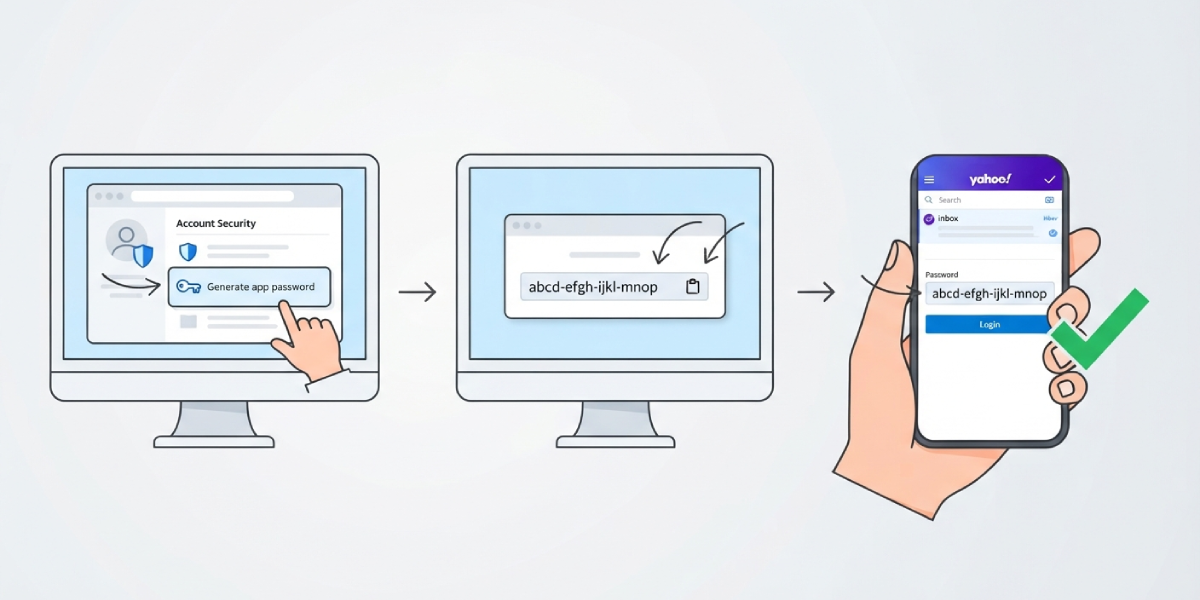
Accounts with two-step verification enabled on Yahoo cannot sign in with the regular password inside Outlook. Yahoo requires an app-specific password for this scenario. Head to Yahoo Account Security settings on a web browser, generate an app password under ‘Generate app password,’ and enter that string instead of the usual login password when Outlook prompts for it.
This one extra step trips up more people than any other part of the process, so it is worth doing first if two-step verification is already active on the account.
Common Problems and Fixes
- Outlook says the password is incorrect, even though it is right: This almost always means two-step verification is on. Generate a Yahoo app password and use that instead.
- The sign-in screen keeps looping back to itself: Close the Outlook app completely, reopen it, and try adding the account again. A weak or dropped internet connection is the usual culprit here.
- Yahoo emails arrive, but contacts or calendar events do not sync: Give it a little time, since the first sync after setup can take several minutes. If nothing appears after 15-20 minutes, remove the account and add it again.
- An ‘account already exists’ message appears: This means the Yahoo address was added to Outlook previously. Check the account list in Settings and remove the duplicate before trying again.
- A security alert email arrives from Yahoo right after setup: This is normal and simply confirms that a new app (Outlook) connected to the account. No action is needed unless the sign-in was not recognized.
Frequently Asked Questions
Is the Outlook mobile app free to use with a Yahoo Mail account?
Yes. The Outlook app is free to download, and connecting a Yahoo Mail account does not require a Microsoft 365 subscription.
Can a Yahoo Mail account be added on both iPhone and Android?
Yes. The steps are the same on both platforms since Outlook uses one consistent design across iOS and Android.
Do multiple Yahoo Mail accounts work in the same Outlook app?
Yes. Repeat the same steps for each additional Yahoo address, and switch between inboxes using the account icons in the menu panel.
Why does Outlook ask for a Yahoo app password instead of the normal one?
This only happens when two-step verification is turned on for the Yahoo account. It is a security measure that keeps the main password from being shared with third-party apps.
Will old Yahoo emails show up right away after adding the account?
Most existing mail appears within a few minutes, though very large mailboxes can take longer to finish the initial sync.
Does adding Yahoo Mail to Outlook change anything in the Yahoo Mail app itself?
No. Both apps pull from the same Yahoo servers, so emails read or deleted in one app reflect in the other without any separate settings.
Can a Yahoo Mail account be removed from Outlook later?
Yes. Go to Settings, tap the Yahoo account, and select ‘Delete Account.’ This removes it from Outlook without deleting the actual Yahoo Mail account.
What if the ‘Add Account’ option is missing from the Settings menu?
Updating the Outlook app to the latest version from the App Store or Google Play usually resolves this, since older versions occasionally hide or relocate the option.
