
Learning how to clean USB and audio ports properly can fix loose connections, static-sounding headphones, and devices that refuse to charge. Dust, lint, and pocket debris build up in these small openings over time, and a few careful minutes with the right tools usually solves the problem without opening the device.
Key Takeaways
- Most port problems come from trapped lint, dust, or oxidation, not hardware failure.
- Compressed air and a soft brush handle the majority of cleaning jobs safely.
- Isopropyl alcohol should only touch metal contacts, never plastic housings or circuit boards, and only when the port is truly dirty rather than just dusty.
- Metal tools like paperclips or tweezers risk bending contact pins and should be avoided.
- A port that still misbehaves after cleaning may have a bent pin or internal damage that needs a technician.
Before You Start
Power down the laptop or PC completely and unplug it from the wall. For a laptop with a removable battery, take the battery out as an extra safety step. Let the device sit for a few minutes if it has been running, since some ports sit close to components that hold heat. Touching a bare metal part of the case, or wearing an anti-static wrist strap, helps discharge static before getting close to any exposed circuitry.
Tools and Materials Needed
- Canned compressed air or a small hand-pump air blower
- Soft-bristled brush, such as a clean, dry paintbrush or a dedicated electronics cleaning brush
- 90 percent or higher isopropyl alcohol
- Lint-free or microfiber cloth, plus cotton swabs with tight-wound tips
- Plastic pry tool or wooden toothpick (never metal)
- A bright flashlight or headlamp for visibility
Tip: Skip anything metal for probing inside a port. A bent contact pin inside a USB-C port is a far more expensive problem than the dust that started it all.
How to Clean USB and Audio Ports Step by Step
This process works for USB-A, USB-C, micro-USB, and the standard 3.5mm audio jack, since the core technique stays the same across all of them.
Step-by-Step Cleaning Process
- Step 1: Shine a flashlight directly into the port to see what is actually inside. Lint often looks like a dark furry clump, while corrosion looks like a dull greenish or grayish coating on the metal contacts.
- Step 2: Hold the compressed air can upright and give the port several short bursts rather than one long continuous blast, which can push moisture out of the can and into the device. Angle the nozzle so air blows debris out rather than deeper in.
- Step 3: Use the soft brush to gently loosen any lint or dust that the air did not dislodge. Small, light strokes work better than pressing hard, since the goal is to sweep debris toward the opening.
- Step 4: Follow up with another round of compressed air to clear out whatever the brush loosened.
- Step 5: If the metal contacts show a dull film or sticky residue, dip a cotton swab tip lightly in isopropyl alcohol, squeeze out the excess so it is barely damp, and gently wipe the visible contacts only. Avoid touching plastic housing pieces or letting liquid pool anywhere inside.
- Step 6: Let the port air dry for a few minutes before plugging anything in. Isopropyl alcohol evaporates quickly, but giving it time removes any risk of a damp connection.
- Step 7: Test the port with a known-working cable or set of headphones to confirm the connection is solid and audio or data transfer works as expected.
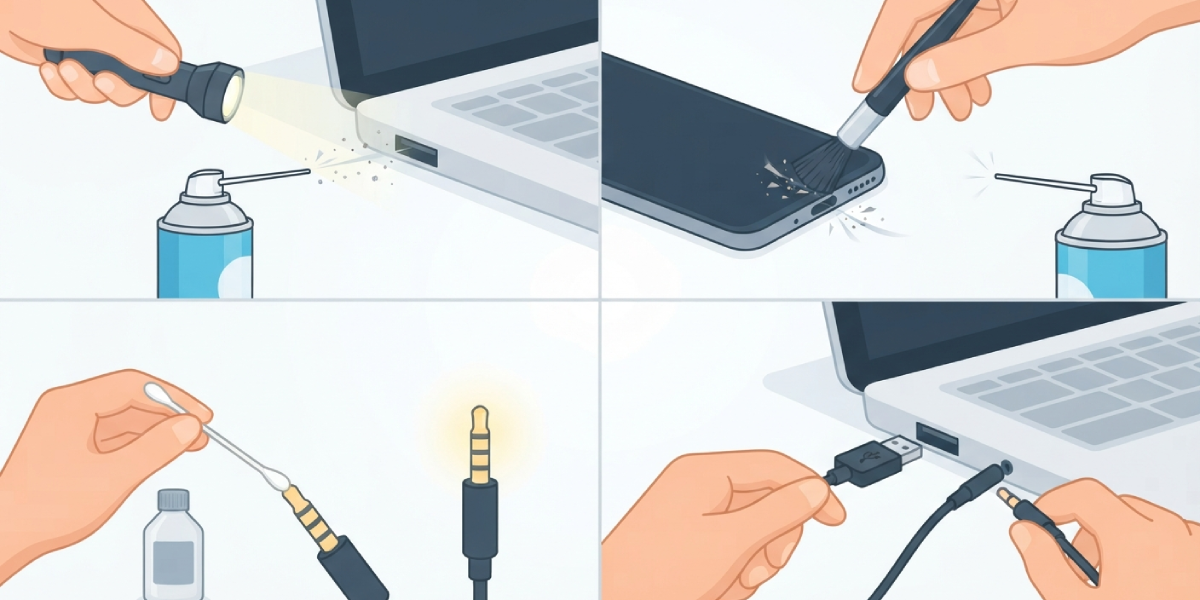
Tip: For a USB-C port with a stubborn buildup at the very back, a dry wooden toothpick trimmed to a fine point can nudge debris loose without scratching the contacts the way metal would.
Cleaning an Audio Jack Specifically
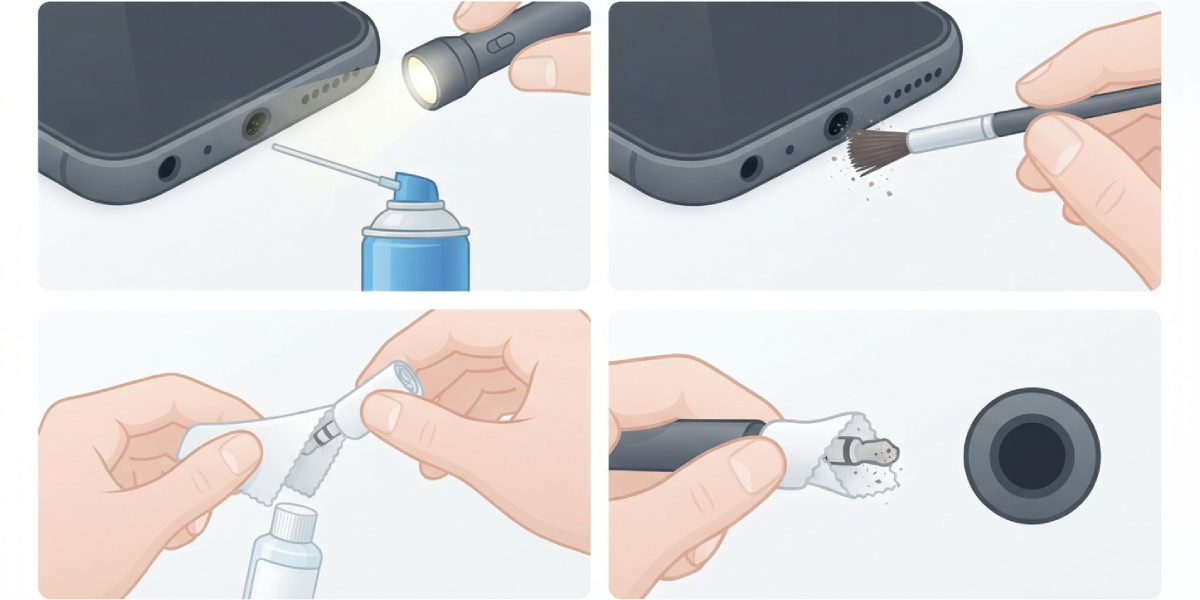
A 3.5mm headphone jack has a narrow tube with a spring-loaded contact deep inside, which makes it more prone to trapping lint from pockets and bags. The same compressed air and brush routine applies, but a rolled-up corner of a lint-free cloth lightly dampened with isopropyl alcohol can reach a bit further into the barrel than a cotton swab. Insert it gently, twist once or twice, and remove it slowly rather than jamming it in and out repeatedly.
Common Problems and Fixes
Port Still Loose After Cleaning
A cable that feels wobbly even in a clean port usually points to worn or slightly bent contacts inside rather than leftover debris. This is a job for a repair technician, since the port itself may need replacement.
Audio Only Plays in One Ear
If cleaning the jack does not resolve this, the spring contact inside may be worn from years of plugging and unplugging headphones. Try a different pair of headphones first to rule out a cable issue before assuming the jack itself is the problem.
USB Device Not Recognized After Cleaning
Give the port a few extra minutes to fully dry, since even a small amount of trapped moisture can prevent a solid connection. If the device still is not recognized, test the same cable and accessory in a different port to isolate whether the issue is the port, the cable, or the device driver.
Visible Corrosion That Will Not Wipe Away
Heavier corrosion sometimes needs more than one gentle alcohol pass. Resist the urge to scrape at it with anything hard. If the greenish buildup persists after two or three careful cleanings, the contacts may be too degraded to fully restore and professional evaluation is the safer next step.
Frequently Asked Questions
How often should USB and audio ports be cleaned?
A quick check every few months is plenty for most users, though anyone working in dusty environments or carrying a laptop in a bag daily may want to check monthly.
Can compressed air alone clean a dirty port?
Compressed air handles loose dust and light lint well, but compacted debris or corrosion on the contacts usually needs a brush and a touch of isopropyl alcohol to fully clear.
Is it safe to use a toothpick inside a USB port?
A wooden toothpick trimmed to a fine, smooth point is safe for gently nudging debris, but it should never be forced or used with pressure against the contacts.
Why does isopropyl alcohol need to be 90 percent or higher?
Higher concentrations evaporate faster and leave behind less water residue, which lowers the risk of moisture lingering near the electrical contacts.
Can water be used instead of isopropyl alcohol?
Water should never go near a port. It evaporates far more slowly than isopropyl alcohol and can lead to corrosion or a short if it reaches the contacts.
Why does a laptop USB port feel loose even though it looks clean?
Looseness usually comes from mechanical wear on the internal contacts rather than dirt, and cleaning will not fix a physically worn connector.
Is it normal for a headphone jack to crackle after cleaning?
Some crackling right after cleaning can come from residual moisture and usually clears up once the port fully dries. If it continues after that, the jack itself may need repair.
Does cleaning a USB port void the warranty?
Cleaning the outside opening of a port with compressed air and a brush typically does not affect a warranty, but opening the device itself to access internal components usually does.
What is the safest tool for reaching deep into a port?
A soft brush combined with compressed air is the safest combination for most situations, since it avoids any contact pressure on the delicate pins inside.
When should a professional handle a dirty or malfunctioning port?
If a port shows bent pins, persistent corrosion, or connection issues after a proper cleaning, a professional technician can inspect and replace the port without risking further damage to the surrounding board.
