
Outlook error 0x80042109 shows up during Send/Receive and almost always means Outlook cannot reach the mail server, even though everything looks connected on the surface. The good news is that this error is one of the more predictable ones in Outlook, and it responds well to a short, specific sequence of fixes rather than guesswork.
Key Takeaways
- Outlook error 0x80042109 is a connectivity error, most often triggered by Work Offline mode or a dropped network connection.
- Turning off Work Offline mode resolves the error in the majority of cases.
- Antivirus email scanning and VPN software are common hidden causes worth checking next.
- A damaged Outlook data file or Send/Receive group can also trigger this error and needs a repair, not a reinstall.
- Most fixes take under ten minutes and do not require IT support.
How to Fix Outlook Error 0x80042109 Step by Step
Work through these steps in order. Skipping ahead is tempting, but each step rules out a specific cause, so starting from the top saves time overall.
Step-by-Step Guide
- Step 1: Open Outlook and click the Send/Receive tab on the ribbon. Look for a button labeled Work Offline. If it appears highlighted or pressed in, click it once to switch Outlook back to online mode. This single click fixes the error for a large share of users, since Outlook throws 0x80042109 whenever it tries to sync while offline.
- Step 2: Confirm the actual internet connection is working. Open a browser and load any website. A weak Wi-Fi signal, a recently disconnected Ethernet cable, or a router that just rebooted can all leave Outlook technically online but unable to sync.
- Step 3: Close Outlook completely, then reopen it. This clears out any stuck connection sessions to the mail server that sometimes linger after a network blip and keep triggering the same error on every sync attempt.
- Step 4: Temporarily disable email scanning in the installed antivirus program. Security software that intercepts incoming and outgoing mail can interrupt the handshake between Outlook and the server, producing this exact error code. Re-enable scanning once Outlook syncs normally again.
- Step 5: If a VPN is active, disconnect it and try syncing again. Corporate VPNs in particular can route mail traffic through a path that blocks the connection Outlook is trying to make.
- Step 6: Go to Control Panel, select Mail, then Data Files. Select the affected data file and click Open File Location, close Outlook, and run scanpst.exe on that file to check for and repair corruption. A damaged data file can produce sync errors even when the connection itself is fine.
- Step 7: Rebuild the Send/Receive group. In Outlook, go to Send/Receive, then Send/Receive Groups, then Define Send/Receive Groups. Remove the existing group and create a new one with the default settings. Corrupted group definitions are a less common cause but a real one, especially after a recent Outlook update.
- Step 8: If the error still appears, repair the Office installation. Open Control Panel, go to Programs and Features, select the Microsoft Office installation, and choose Change, then Quick Repair. Try Online Repair only if the quick option does not resolve it.
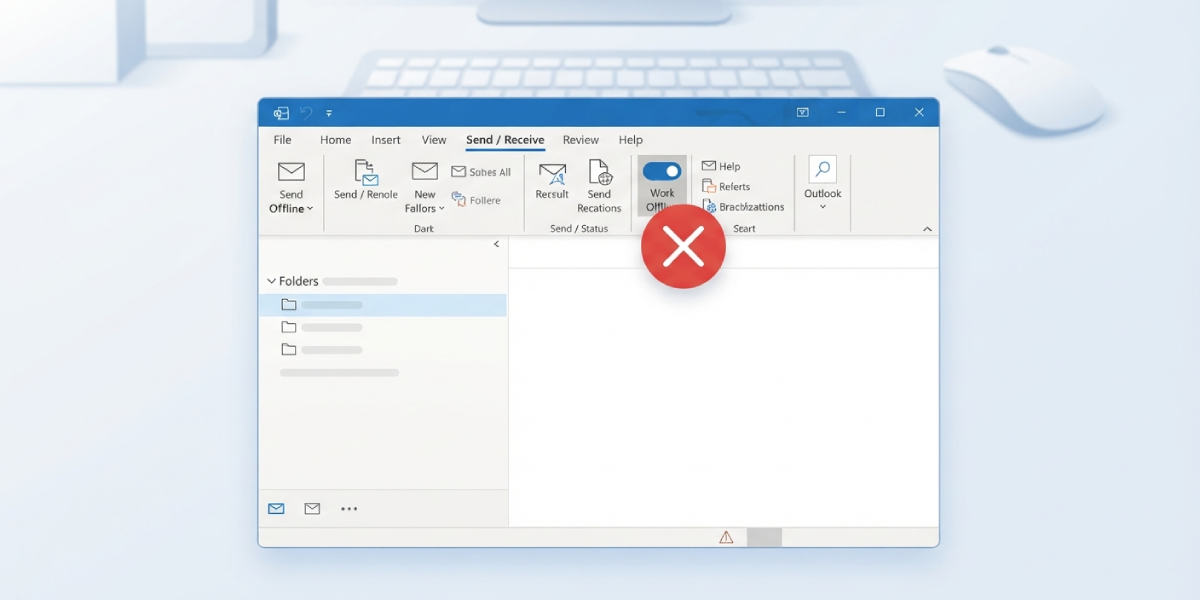
Tip: Note which account triggers the error before making any changes. If only one account fails while others sync fine, the issue is almost always with that account’s server settings rather than Outlook itself, which points straight to Step 6 or a settings check on that account.
Common Problems and Fixes
- Work Offline button looks off but the error still appears: Click Work Offline twice, once to switch it on and once to switch it back off. This forces Outlook to fully reset its connection state instead of just toggling a stuck UI element.
- Error only happens on a laptop after waking from sleep: Give the network adapter about fifteen seconds to fully reconnect after wake before opening Outlook. Syncing too soon after wake is a frequent trigger.
- Error appears repeatedly even with a stable connection: Check for a pending Windows or Outlook update. A partially applied update can leave the mail sync service in an inconsistent state until the update finishes installing and the machine restarts.
- Error only affects one shared mailbox or IMAP account: Remove that account from Outlook and re-add it. IMAP accounts in particular are sensitive to outdated cached server settings that a full re-add clears out.
- Scanpst.exe finds no errors but the sync still fails: The data file is not the cause. Move on to rebuilding the Send/Receive group in Step 7, since that is the next most likely source once corruption has been ruled out.
Frequently Asked Questions
What does Outlook error 0x80042109 actually mean?
It means Outlook attempted a Send/Receive action but could not establish or maintain a connection to the mail server, usually because of offline mode, a network interruption, or software blocking the connection.
Is Outlook error 0x80042109 a sign of a virus or hacked account?
No. It is a connectivity error, not a security warning. It relates to how Outlook communicates with the server, not to account compromise.
Why does this error keep coming back after turning off Work Offline mode?
A recurring error usually points to a secondary cause, such as antivirus email scanning, a VPN, or a corrupted Send/Receive group, rather than offline mode itself.
Does this error mean emails were lost?
No. Emails already delivered to the mail server remain there. The error simply stops the current sync attempt until the connection issue is resolved.
Can a VPN really cause this error?
Yes. Some VPNs route or block mail ports in a way that prevents Outlook from reaching the server, which produces this exact error code.
Should Outlook be reinstalled to fix this?
Reinstalling is rarely necessary. A Quick Repair through Control Panel resolves the same underlying issues without the extra time a full reinstall takes.
How long does scanpst.exe take to run?
It depends on the size of the data file, but most personal mailboxes finish in a few minutes. Larger shared mailboxes can take longer.
Does this fix work for both Outlook desktop and Outlook on the web?
This error is specific to the Outlook desktop application. Outlook on the web does not use the same Send/Receive process and does not produce this code.
Can antivirus software cause this error even if it is up to date?
Yes. Being up to date does not stop email scanning features from intercepting the connection. The scanning behavior itself is the trigger, not the software version.
What should be checked first if the error appears right after a Windows update?
Restart the computer fully, since updates sometimes need a restart to finish applying network-related changes that affect how Outlook connects.
