
Sticky residue on a laptop body usually shows up after peeling off an old sticker, wiping up a spilled drink, or years of hand oils building up near the palm rest. Cleaning it the right way keeps the finish looking sharp without damaging the plastic, paint, or coating underneath.
Key Takeaways
- Isopropyl alcohol at 90 percent or higher, applied with a microfiber cloth, removes most sticky residue without harming laptop finishes.
- Power the laptop off and unplug it before cleaning anything on the body.
- Never spray liquid directly onto the laptop; always apply it to the cloth first.
- Plastic pry tools help lift stubborn residue without scratching the surface.
- Let the laptop dry completely before powering it back on.
Before You Start
A few quick prep steps make this job safer and more effective.
Safety Steps
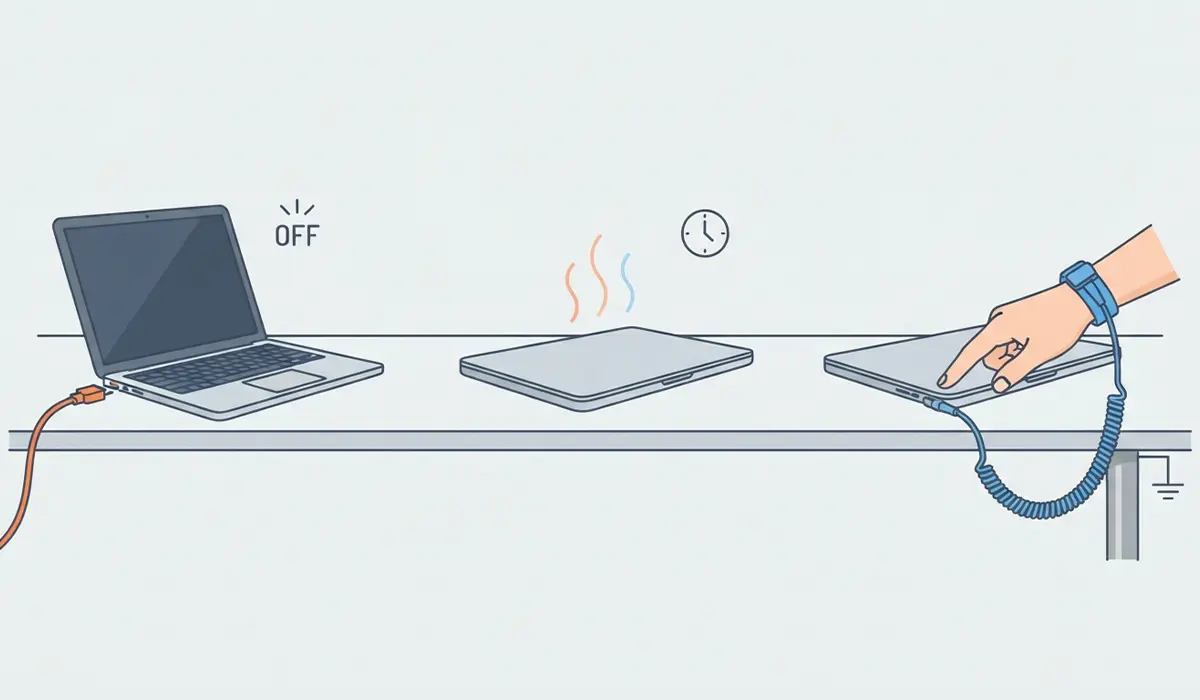
- Power off the laptop completely and unplug the charger.
- Let the machine cool down if it has been running, since a warm chassis can make some adhesives smear instead of lift.
- Touch a bare metal surface or use an anti-static wrist strap if opening any panel is part of the cleaning plan, though this task rarely requires opening the case.
Tools and Materials Needed
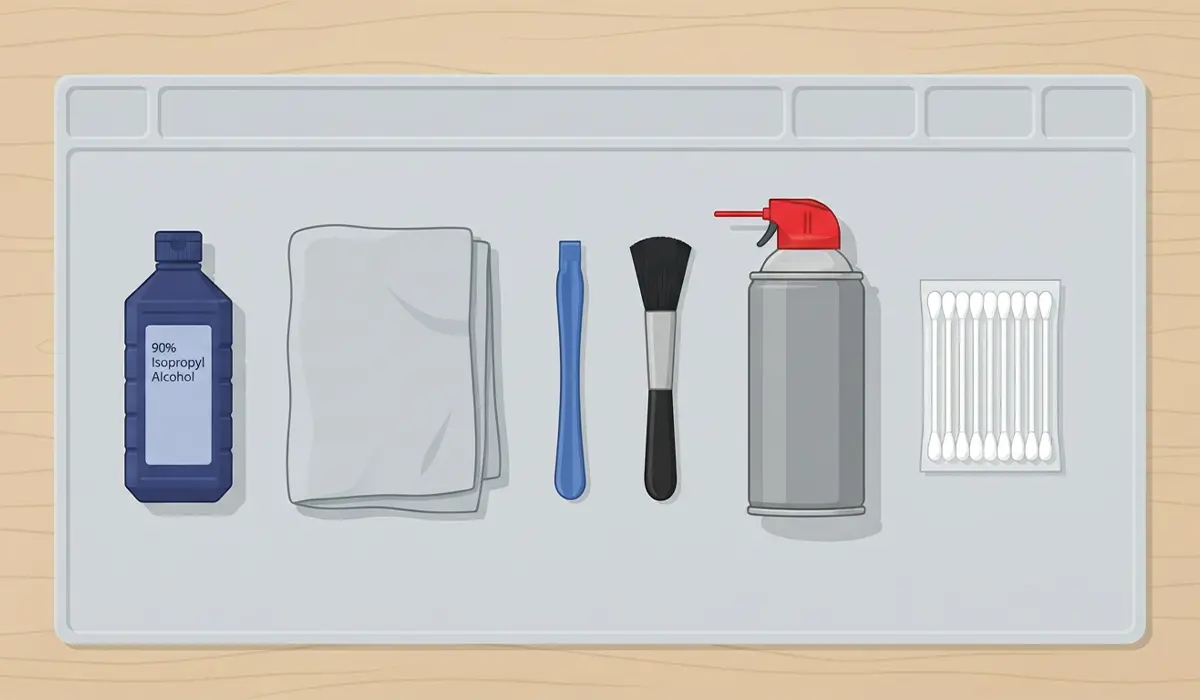
- 90 percent or higher isopropyl alcohol
- Lint-free or microfiber cloths
- Plastic pry tool or an old plastic card
- Soft-bristle brush for crevices and vents
- Compressed air for loose debris
- Cotton swabs for tight corners and hinges
Tip: Avoid acetone-based removers or nail polish remover on laptop bodies. They can dissolve certain plastics and strip away coatings that isopropyl alcohol leaves untouched.
Step-by-Step: Removing Sticky Residue From a Laptop Body
- Step 1: Power down the laptop, unplug it, and set it on a flat, well-lit surface. Wipe away loose dust or crumbs with compressed air first, since gritty debris can scratch the finish once alcohol softens the residue.
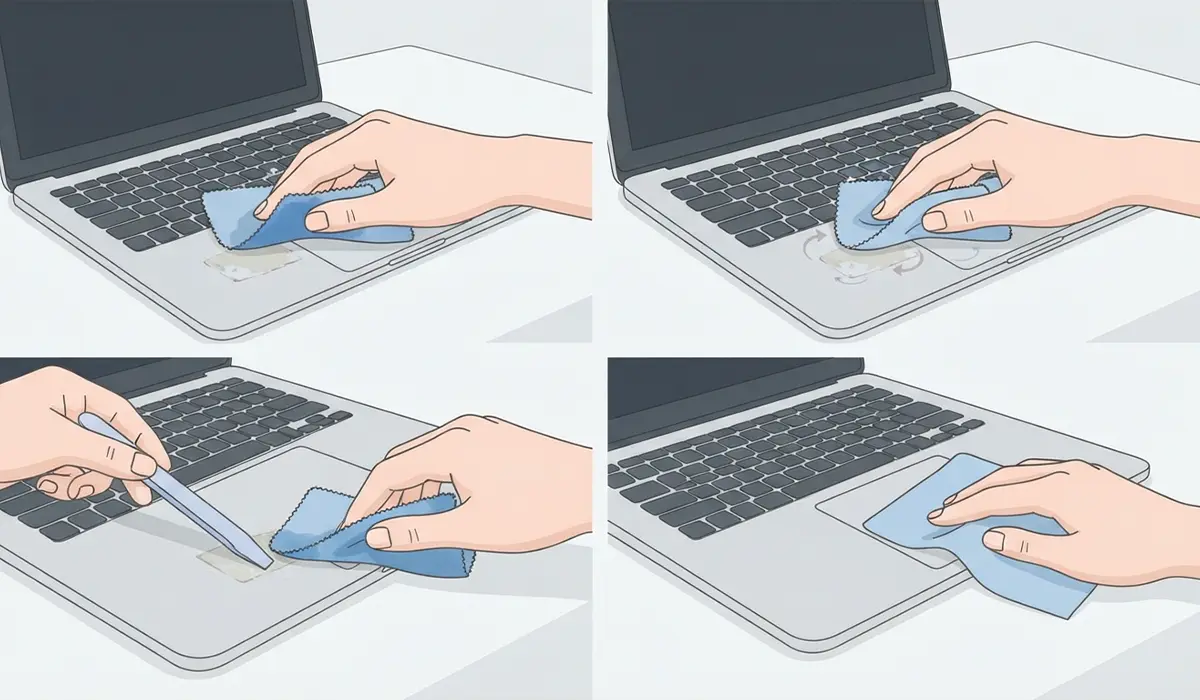
- Step 2: Dampen a corner of the microfiber cloth with isopropyl alcohol. The cloth should feel wet to the touch but not dripping, since excess liquid can seep into vents, ports, or seams.
- Step 3: Press the damp cloth directly onto the sticky area and hold it in place for 20 to 30 seconds. This gives the alcohol time to break down the adhesive instead of just smearing it around.
- Step 4: Gently rub the area in small circles. Most light residue lifts away at this point. For a leftover sticker edge or hardened glue spot, use the plastic pry tool at a shallow angle to lift the edge, then wipe again with the cloth.
- Step 5: Work into corners, hinges, and textured areas with a cotton swab dipped in alcohol. These spots trap residue that a flat cloth cannot reach.
- Step 6: Wipe the entire surface a second time with a clean, dry section of the cloth to lift any dissolved residue before it has a chance to resettle as the alcohol evaporates.
- Step 7: Inspect the surface under good lighting. Repeat steps 2 through 4 on any remaining spots, since thicker residue sometimes needs two or three passes rather than one aggressive scrub.
- Step 8: Let the laptop air dry for a few minutes before closing the lid or powering it on. Isopropyl alcohol evaporates quickly, but giving it a moment ensures no moisture lingers near ports or seams.
Common Problems and Fixes
Residue Comes Back After a Few Days
This usually means a thin adhesive layer was softened but not fully lifted. Repeat the cleaning process, holding the damp cloth on the spot slightly longer before wiping.
Faint Discoloration or Cloudy Patch Appears
Some textured or soft-touch coatings react to prolonged alcohol contact. Stop cleaning that spot immediately and let it dry fully. If discoloration remains once dry, avoid further alcohol use there and consider having a repair technician assess the coating.
Sticky Feel Persists Even After Wiping
A tacky residual film often means the cloth redistributed dissolved adhesive instead of lifting it away. Switch to a fresh, dry section of cloth for the final wipe-down instead of reusing the same damp spot.
Residue Trapped in Vents or Speaker Grilles
Liquid cleaners are not safe here. Use compressed air first, then a soft brush dipped lightly in alcohol and squeezed nearly dry to avoid pushing moisture into internal components.
Alcohol Smell Lingers After Cleaning
This fades naturally within an hour or two as the alcohol finishes evaporating. Placing the laptop in a well-ventilated area speeds this up.
Frequently Asked Questions
Is isopropyl alcohol safe on all laptop finishes?
It is safe on most painted, anodized, and standard plastic finishes at 90 percent concentration or higher. Soft-touch or rubberized coatings are more sensitive, so test a small hidden area first, such as the underside near a foot pad.
Can rubbing alcohol be used instead of isopropyl alcohol?
Standard rubbing alcohol is often isopropyl alcohol at a lower concentration, typically 70 percent. It can still work, but it evaporates more slowly and leaves more moisture behind, so extra drying time matters.
What removes sticker residue without alcohol?
A plastic pry tool used carefully to lift the edge, combined with gentle warmth from body heat or a warm cloth, can loosen some adhesives. Alcohol still tends to finish the job faster and more completely.
Is it safe to use baby oil or cooking oil on sticky spots?
These are not recommended for laptop exteriors. Oils can leave a greasy film that attracts more dust and are difficult to fully remove from textured surfaces.
Why does the sticky residue keep attracting dust after cleaning?
Any leftover adhesive film, even a very thin one, acts like a magnet for dust. A second pass with a clean, dry cloth after the alcohol dries usually resolves this.
Can the same method be used on a laptop lid with a logo sticker?
Yes. Peel the sticker off slowly at a low angle first, then follow the same alcohol-and-cloth process on any glue left behind.
Is it safe to clean the laptop while it is still warm from use?
It is better to let it cool first. Heat can cause some adhesives to smear rather than lift, and a warm chassis makes alcohol evaporate before it has time to work.
Will this method work on keyboard keys or the trackpad?
The same alcohol-and-cloth approach works on the keyboard deck and trackpad surface. Avoid letting liquid drip between the keys; a lightly dampened cotton swab is safer for those tight gaps.
How often should a laptop body be cleaned to prevent buildup?
Wiping down the body every few weeks with a dry or slightly damp microfiber cloth prevents oils and dust from hardening into stubborn residue over time.
When should a professional be called instead of cleaning it manually?
If residue has seeped into a vent, port, or seam and cannot be reached safely, or if a coating starts peeling or discoloring, a repair technician can address it without risking further damage. Opening the laptop case for deeper cleaning may also affect the manufacturer’s warranty.
