
Learning how to fix dual boot not showing OS options usually comes down to one thing: the boot menu that lists Windows and Linux has been bypassed, hidden, or overwritten. The good news is that both operating systems are almost always still intact on the drive. Only the path to them needs repairing.
Key Takeaways
- A missing OS menu is almost always a bootloader or firmware problem, not data loss.
- Check the firmware boot order and the one-time boot menu first, because this takes under a minute.
- Windows updates and Fast Startup are the most common reasons the GRUB menu disappears.
- Re-enabling os-prober and running update-grub restores missing Windows entries on most Linux systems.
- Reinstalling GRUB from a live USB fixes the stubborn cases without touching personal files.
Before You Start
Back up anything important before changing boot settings. Have a bootable live USB of the installed Linux distribution ready, since it is the safety net if the menu cannot be restored from inside the installed system. If Windows uses BitLocker, locate the recovery key first, because changes to boot settings can trigger a recovery prompt. Never delete or reformat partitions while troubleshooting. If the partition layout is unclear and the data matters, stop and ask an experienced technician to take a look.
Common Causes of Dual Boot Not Showing OS Options
Think of the bootloader as a receptionist who directs visitors to the right office. When the receptionist is replaced or goes missing, visitors walk straight into whichever office is closest. Here are the usual reasons that happens.
- A Windows feature update or repair replaced the boot entry, so the PC boots straight into Windows Boot Manager.
- The firmware boot order puts Windows Boot Manager ahead of the GRUB or Linux entry.
- Windows Fast Startup or hibernation left the drive in a locked state, which blocks detection of the Windows partition from Linux.
- The GRUB menu is set to hidden or has a timeout of zero, so it flashes past without appearing.
- os-prober is disabled, which is the default in recent GRUB versions, so Windows is never added to the menu.
- Secure Boot or a UEFI and Legacy mode mismatch is blocking the Linux bootloader.
- The GRUB files or the EFI System Partition entry were damaged or removed.
How to Fix Dual Boot Not Showing OS Options
Check the Boot Menu and Firmware Boot Order
- Step 1: Restart the PC and press the one-time boot menu key as soon as the logo appears. Common keys are F12, F10, F9, or Esc, depending on the manufacturer.
- Step 2: Look for an entry named after the Linux distribution (for example ubuntu) or one that mentions GRUB. If it appears, select it. A working GRUB menu means the bootloader is fine and only the boot order needs fixing.
- Step 3: Enter the BIOS or UEFI setup and open the boot priority or boot order page. Move the Linux or GRUB entry above Windows Boot Manager, then save and exit.
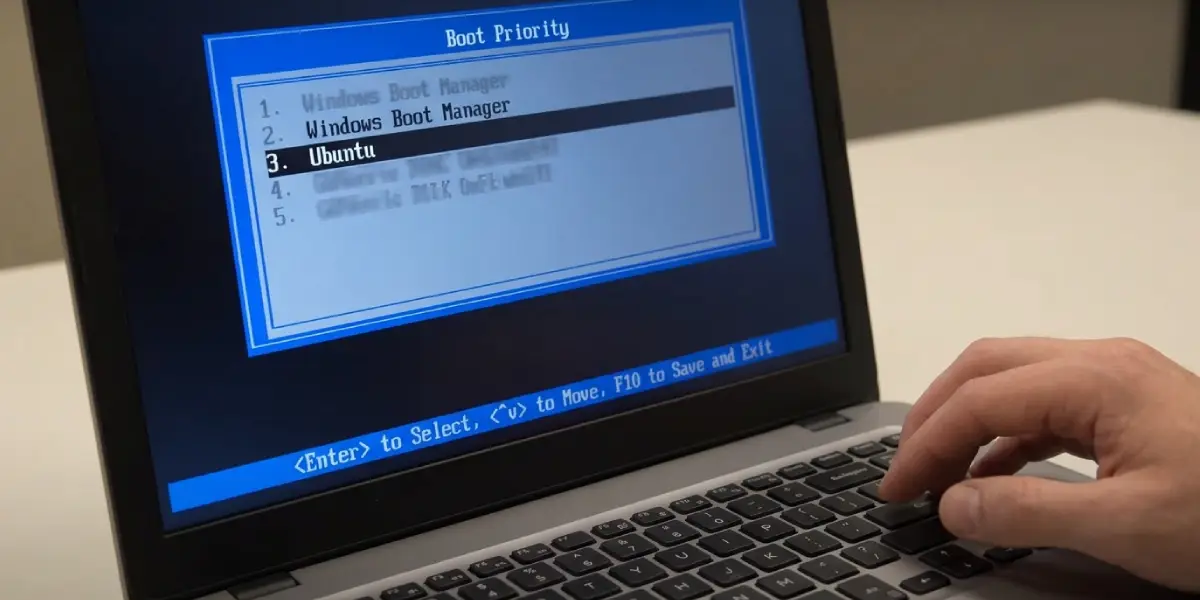
Tip: If the boot menu lists only Windows Boot Manager, the Linux entry may have been wiped from the firmware. Skip ahead to the GRUB reinstall steps below.
Turn Off Fast Startup in Windows
- Step 4: Boot into Windows, open Control Panel, and go to Power Options.
- Step 5: Select ‘Choose what the power buttons do’, then ‘Change settings that are currently unavailable’.
- Step 6: Untick ‘Turn on fast startup (recommended)’, save the changes, and perform a full shutdown rather than a restart.
Make the GRUB Menu Visible
- Step 7: Boot into Linux and open a terminal. Open the file /etc/default/grub with administrator rights in a text editor.
- Step 8: Set GRUB_TIMEOUT_STYLE=menu and set GRUB_TIMEOUT=10. Remove or comment out any GRUB_TIMEOUT_STYLE=hidden line.
- Step 9: Save the file and run sudo update-grub on Debian, Ubuntu, and Mint. On Fedora and similar distributions, run sudo grub2-mkconfig -o /boot/grub2/grub.cfg instead.

Enable os-prober So Windows Is Detected
- Step 10: Make sure the os-prober package is installed using the distribution’s package manager.
- Step 11: In /etc/default/grub, add or edit the line GRUB_DISABLE_OS_PROBER=false.
- Step 12: Run the update command from the previous section. The output should include a line saying that Windows Boot Manager was found. If it does, reboot and check the menu.
Tip: If os-prober finds nothing, confirm that Fast Startup is off and that the Windows partition is not in a hibernated state, since a locked partition is skipped during detection.
Reinstall GRUB From a Live USB
When the Linux entry is gone entirely, the bootloader needs to be reinstalled. Many Ubuntu-based distributions offer a graphical Boot-Repair tool that automates this, and it is a sensible first attempt. The manual method works on any distribution.
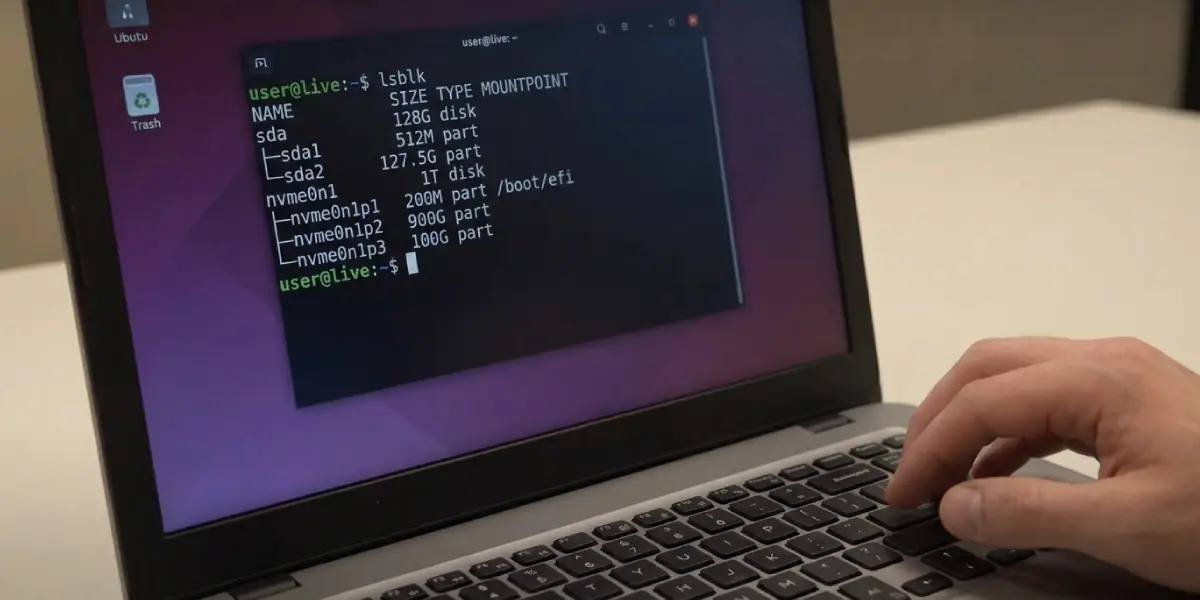
- Step 13: Boot from the live USB in UEFI mode and open a terminal.
- Step 14: Identify the partitions with lsblk. Find the Linux root partition and the small FAT32 EFI System Partition.
- Step 15: Mount the root partition to /mnt, then mount the EFI partition to /mnt/boot/efi. Bind mount /dev, /dev/pts, /proc, /sys, and /run into /mnt.
- Step 16: Enter the installed system with chroot /mnt.
- Step 17: Run grub-install –target=x86_64-efi –efi-directory=/boot/efi –bootloader-id=ubuntu, replacing the bootloader ID with the distribution name if different.
- Step 18: Run update-grub, exit the chroot, unmount the partitions, and reboot.
Check Secure Boot and Boot Mode
- Step 19: In the BIOS or UEFI setup, confirm the boot mode is UEFI and not Legacy or CSM, matching how both systems were installed.
- Step 20: If the Linux entry appears but fails to start, temporarily disable Secure Boot and test again. Most mainstream distributions support Secure Boot, but custom kernels or unsigned drivers can trigger a block.
Common Problems and Fixes
The PC Boots Straight Into Windows After an Update
A Windows update reset the boot entry. Reorder the firmware boot priority first. If the Linux entry is no longer listed, reinstall GRUB from a live USB. Another option is to open an elevated Command Prompt in Windows and run bcdedit /set {bootmgr} path \EFI\ubuntu\grubx64.efi, adjusting the folder name to match the installed distribution.
GRUB Appears but Windows Is Missing
This points to os-prober. Set GRUB_DISABLE_OS_PROBER=false, disable Fast Startup, and run update-grub again. Check that the Windows EFI files are present on the EFI System Partition.
The Menu Shows for a Split Second and Disappears
The timeout is too short or the menu style is hidden. Set GRUB_TIMEOUT_STYLE=menu with a timeout of five to ten seconds and regenerate the configuration.
A grub rescue Prompt Appears
GRUB has lost track of its files, often after a partition change. The reliable fix is to boot a live USB and reinstall GRUB using the chroot method above.
BitLocker Asks for a Recovery Key After Changes
Altering boot order or Secure Boot can trigger a recovery prompt. Enter the recovery key, and Windows will accept the new boot configuration afterward.
The Menu Works but the Selected OS Will Not Start
The entry may point to a missing partition or a damaged system. Regenerate the GRUB configuration, and if Windows is the failing entry, run Startup Repair from Windows recovery media, then repeat the GRUB update from Linux.
Frequently Asked Questions
Why is my dual boot menu not showing both operating systems?
The boot menu is usually bypassed by the firmware boot order, hidden by a zero timeout, or missing an entry because os-prober is disabled or the bootloader was overwritten.
Will fixing the dual boot menu delete my files?
No. Boot repair changes only the bootloader and its configuration. Personal files stay untouched as long as no partitions are formatted or deleted.
Why did Windows remove my Linux boot option?
Major Windows updates can reset the boot manager entry in the firmware, making the PC start Windows directly. Linux remains installed and can be reached again by restoring the boot order or reinstalling GRUB.
How do I get to the GRUB menu if it does not appear?
Hold Shift during startup on BIOS systems, or tap Esc on UEFI systems, right after the firmware logo disappears. Alternatively, use the one-time boot menu key and pick the Linux entry.
What does os-prober do?
os-prober scans the drives for other installed operating systems, such as Windows, and lets update-grub add them to the boot menu automatically.
Does Fast Startup affect dual booting?
Yes. Fast Startup keeps Windows partly hibernated, which can lock its partition and stop Linux from reading it, so the Windows entry may not be detected or mounted safely.
Do I need to disable Secure Boot to dual boot?
Not always. Many popular distributions work with Secure Boot enabled. Disabling it is only needed when the bootloader or kernel is unsigned and gets blocked.
Can I fix a missing dual boot menu without a live USB?
If Linux still boots from the one-time boot menu, the repair can be done from inside the installed system with update-grub. A live USB is needed only when neither system can reach the bootloader.
