
A laptop charging slowly can turn a quick power-up into a long wait before the battery reaches a usable level. This usually comes down to a handful of common culprits, from a mismatched charger to background apps quietly draining power while the battery tries to fill up. The good news is that most causes are easy to check and fix without any tools or technical background.
Key Takeaways
- Slow charging is most often caused by using the wrong wattage adapter, a worn cable, or a dirty charging port.
- High CPU and GPU usage while plugged in competes with the battery for incoming power, slowing the charge rate.
- Enabling a ‘Fast Charge’ or ‘Rapid Charge’ setting in the laptop’s power software can noticeably speed things up if the manufacturer offers one.
- An aging battery loses its ability to accept a full charge quickly, even with a healthy charger and cable.
- Heat slows charging on purpose, since most laptops throttle charge speed to protect the battery when internal temperatures climb.
Common Causes of Slow Laptop Charging
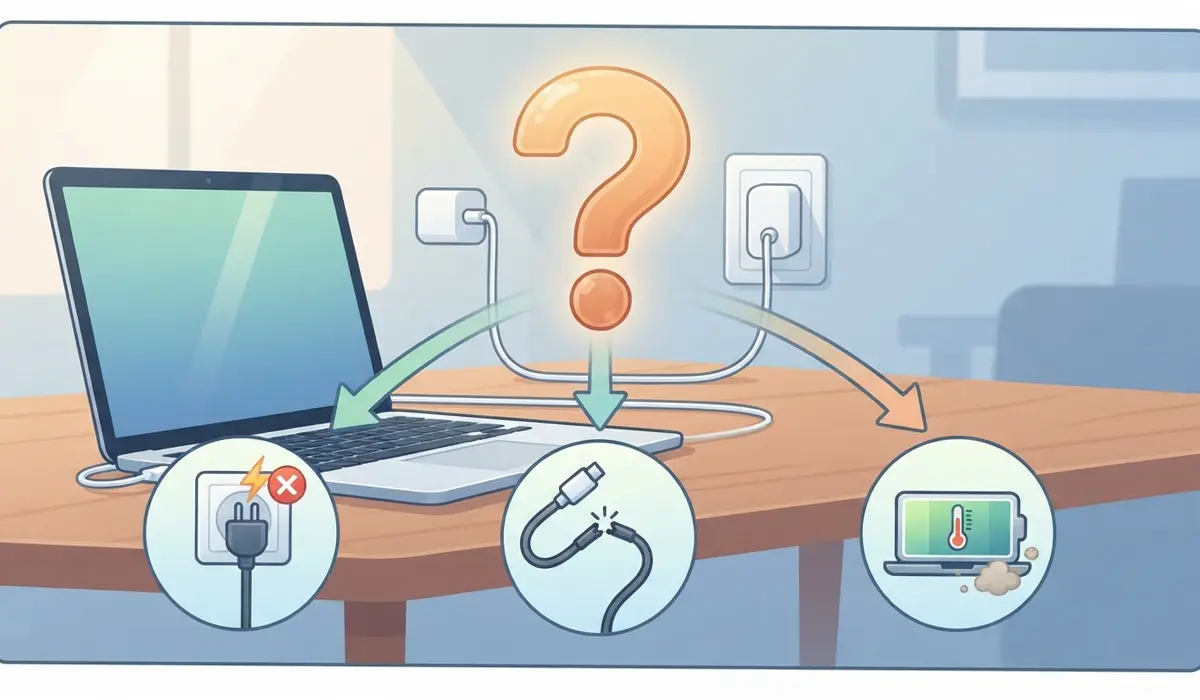
Before jumping into fixes, it helps to understand why laptop charging slowly happens in the first place. A few patterns show up again and again in real-world troubleshooting.
Wrong or Underpowered Charger
Every laptop is designed around a specific wattage. A 45W charger plugged into a laptop built for 65W or 90W will still charge the battery, but at a fraction of the normal speed, especially if the laptop is in use at the same time.
Worn Cable or USB-C Port Issues
USB-C charging cables carry both power and data, and internal wire damage is not always visible from the outside. A cable that looks fine can still be delivering far less current than it should.
Heavy Background Usage
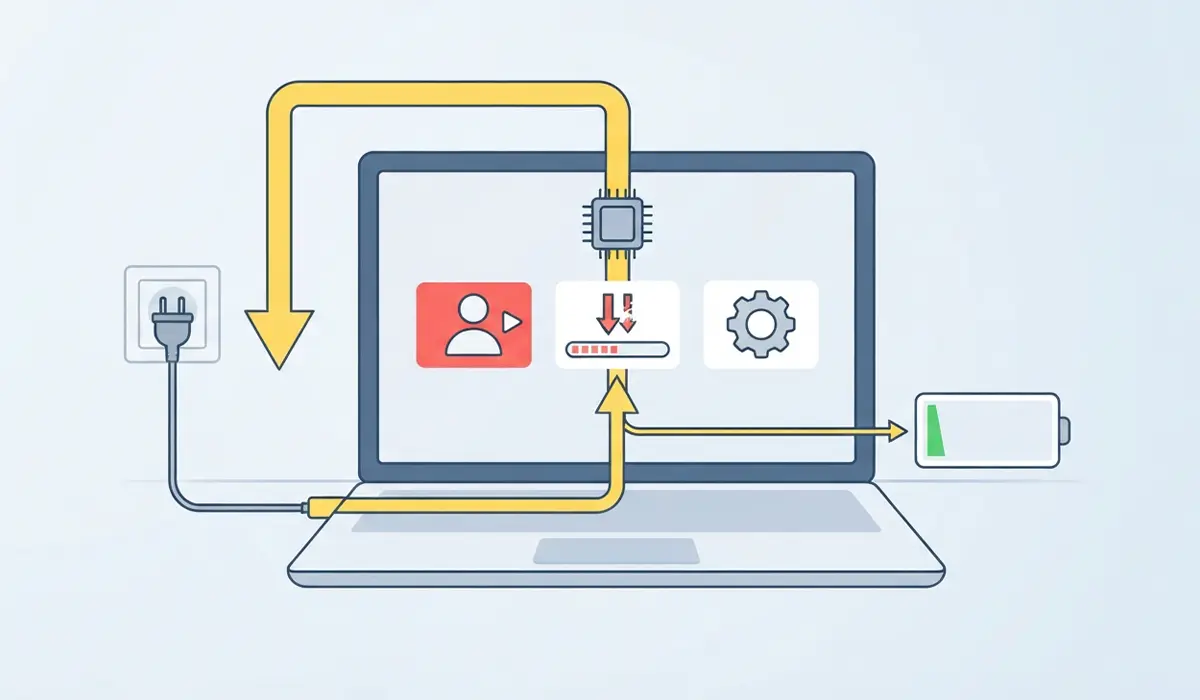
Video calls, large downloads, and demanding software all pull power directly from the system while it is plugged in. That power gets prioritized over battery charging, which is why a laptop under load can charge at a crawl even connected to its original charger.
Battery Health Decline
Lithium-ion batteries lose capacity and charging efficiency over hundreds of charge cycles. An older battery often accepts current more slowly, particularly once it climbs above 80 percent.
Thermal Throttling
Most laptops intentionally slow the charge rate when internal temperatures rise too high, since fast charging generates extra heat that can degrade the battery over time.
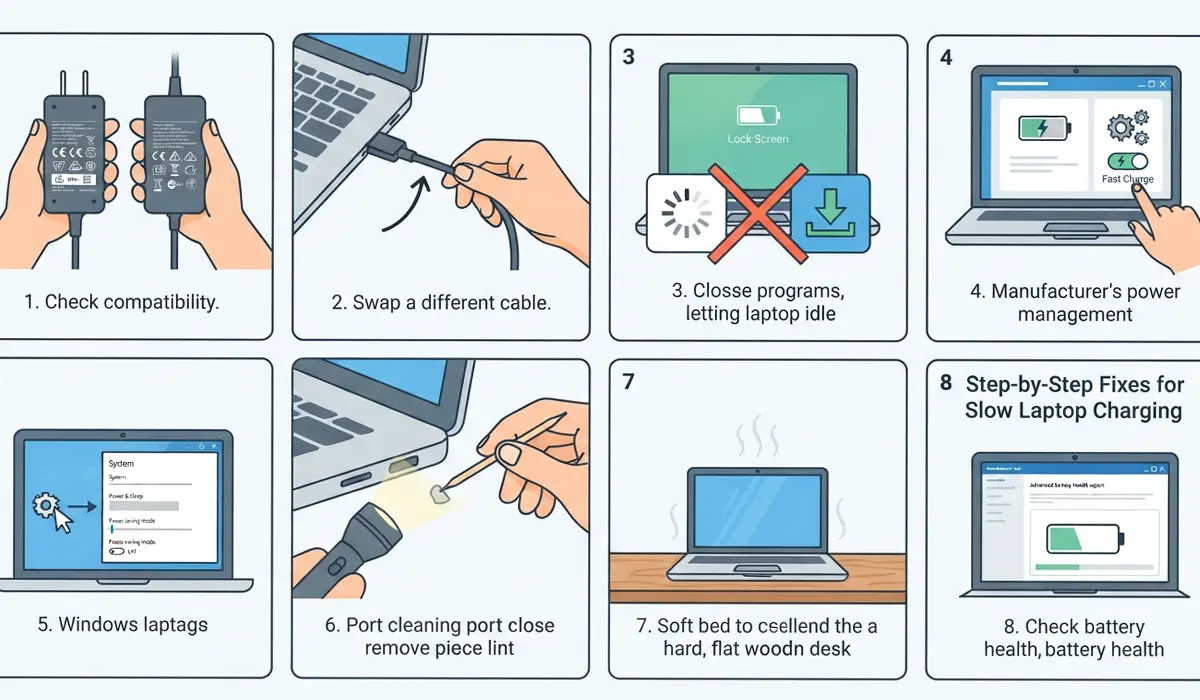
Step-by-Step Fixes for Slow Laptop Charging
Work through these steps in order, since they move from the quickest checks to the more involved ones.
- Step 1: Confirm the charger matches the laptop’s rated wattage. Check the label on the original power brick or the specifications page for the laptop model, and compare it to the adapter currently in use.
- Step 2: Swap in a different charging cable, ideally one rated for the laptop’s full wattage, and watch whether the charging speed improves within a few minutes.
- Step 3: Close demanding background programs, pause large downloads, and let the laptop sit idle on the lock screen for ten to fifteen minutes to see if the charge percentage climbs faster.
- Step 4: Open the manufacturer’s power or battery management software and look for a Fast Charge, Rapid Charge, or Express Charge toggle, then enable it if present.
- Step 5: Check Windows power settings by going to Settings, then System, then Power, and confirm the plan is not set to an aggressive power-saving mode that limits charging behavior.
- Step 6: Inspect the charging port for lint, dust, or debris using a flashlight, and clear it gently with a wooden toothpick or a can of compressed air if anything is visible.
- Step 7: Let the laptop cool down if it feels warm to the touch, placing it on a hard, flat surface rather than a bed or cushion, then reconnect the charger once it has cooled.
- Step 8: Check battery health through the manufacturer’s diagnostic tool or built-in battery report, since a battery reporting significantly reduced capacity is likely the root cause and may need replacement.
Tip: Charging a laptop while it is powered off, rather than in sleep mode or active use, almost always results in the fastest possible charge speed.
Common Problems and Fixes
Charging Slows Down Only Above 80 Percent
This is normal behavior for most lithium-ion batteries and many manufacturers build in a deliberate slowdown near full charge to protect long-term battery health. No fix is needed here.
Laptop Charges Fine Plugged Into One Outlet but Slowly Into Another
This usually points to a weak or shared USB-C hub or dock rather than the laptop itself. Try connecting the original charger directly into a wall outlet to confirm.
Charging Speed Dropped Suddenly After a Windows Update
Occasionally an update resets power plan settings or driver behavior. Reinstalling or updating the chipset and battery drivers from the manufacturer’s support page often resolves this.
Battery Percentage Barely Moves Even After an Hour
If the wattage, cable, and port have all been checked and nothing improves, a failing battery or a faulty charging circuit on the motherboard is the likely cause, and professional diagnosis is the safer next step.
Frequently Asked Questions
Why is the laptop charging slowly all of a sudden?
A sudden slowdown is typically caused by a software update changing power settings, a cable starting to fail, or increased background activity pulling power away from the battery.
Does using the laptop while it charges slow down the charging speed?
Yes. Running demanding tasks while plugged in directs more power to the processor and graphics hardware, leaving less available for the battery.
Can a third-party charger cause slow charging?
A charger with lower wattage than the laptop requires, or one that does not properly support the laptop’s charging protocol, can noticeably slow the charge rate.
Is it bad to leave a laptop plugged in all the time?
Modern laptops manage this well by limiting charge past a certain point, but consistently keeping the battery near 100 percent for long periods can contribute to gradual capacity loss.
Why does the laptop charge faster when it is turned off?
With the system off, all incoming power goes directly to the battery instead of being split with the processor, display, and other components.
How can battery health be checked on a laptop?
Most manufacturers include a battery diagnostic tool in their power management software, and Windows can also generate a battery report through the command prompt.
Does a dirty charging port really affect charging speed?
Yes. Dust or debris in the port can prevent a solid connection, which may cause intermittent or reduced power delivery even if the cable is fully inserted.
Should a laptop charger feel hot during use?
A slightly warm charger is normal, but one that feels very hot to the touch may be struggling to deliver power efficiently or could be a sign of a developing fault.
When should a laptop battery be replaced instead of troubleshooted further?
If the battery health report shows a significant capacity drop and charging remains slow after ruling out the charger, cable, and settings, replacement is usually the most reliable fix.
