
Knowing how to fix mechanical keyboard double typing saves a lot of frustration, because a single key that registers twice can ruin passwords, code, and every sentence it touches. The problem is almost always a worn, dirty, or misconfigured switch rather than a dead keyboard. Most cases can be fixed at home with a few basic tools and a methodical approach.
Key Takeaways
- Double typing, often called key chatter, usually comes from dirty or worn switch contacts, or from a debounce setting that is too low.
- Rule out software first by testing in a plain text editor and checking Windows Filter Keys settings.
- Cleaning around the switch and adjusting debounce in firmware fixes many cases without any parts.
- Replacing a single switch is the most reliable permanent fix on hot-swap boards.
- A soldered board with a failing switch is a job for careful desoldering or a professional.
Common Causes of Mechanical Keyboard Double Typing
Understanding the cause points directly to the right fix. Most double typing falls into one of these groups.
Worn or Dirty Switch Contacts
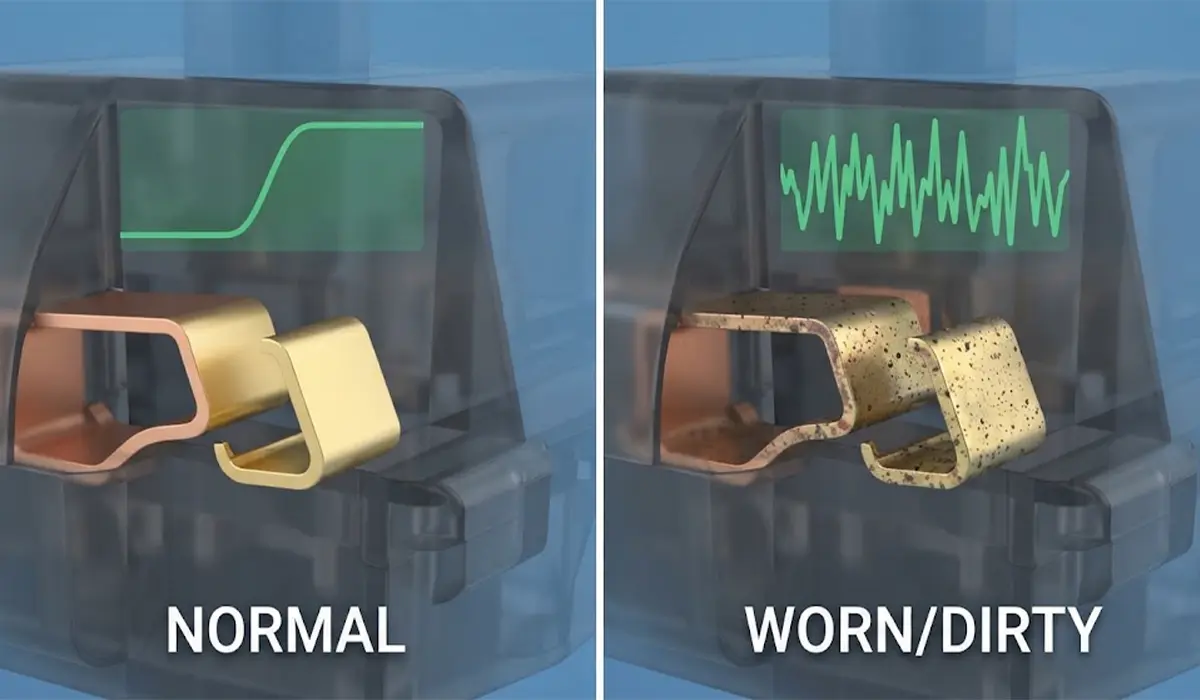
Inside a typical mechanical switch, metal contacts touch to register a keypress. Over time, dust, skin oils, and oxidation can make that contact uneven, so it opens and closes several times during one press. This is the classic cause of chatter, and it tends to affect the most heavily used keys first.
Debounce Settings That Are Too Low
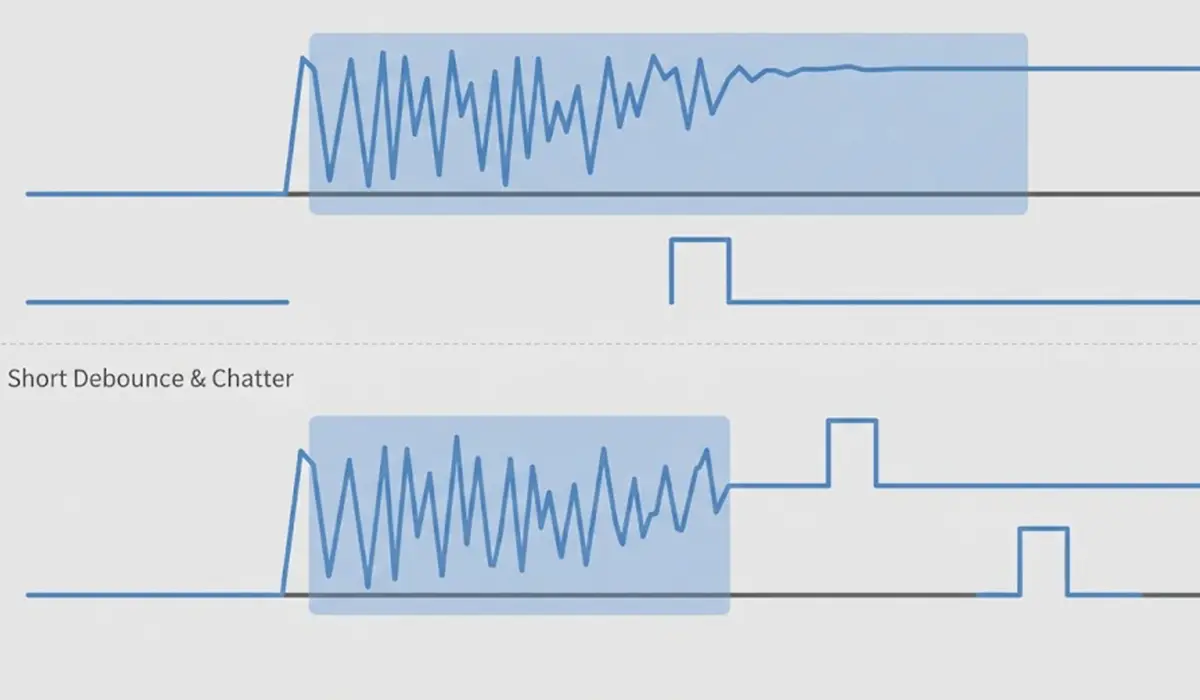
When a switch closes, the contacts bounce for a tiny moment. Keyboard firmware filters this out using a debounce delay. If the delay is too short for a switch that has aged, the bounce slips through as a second keystroke.
Spills and Debris
Sugary drinks, crumbs, and pet hair can leave residue under a keycap or inside a switch. Sticky residue can hold a contact open or closed at the wrong moment.
Loose Sockets or Solder Joints
On hot-swap boards, a switch that is not fully seated or a worn socket can make an unreliable connection. On soldered boards, a cracked joint can cause the same symptom.
Software and Accessibility Settings
Operating system key repeat settings, a stuck modifier, or a conflicting utility can also look like double typing. These are quick to rule out, which is why they come first in the steps below.
Before You Start
Unplug the keyboard from the computer, or switch off a wireless board and remove its batteries if it has removable ones. Touch a bare metal surface to discharge static before handling the circuit board. Work on a clean, well-lit surface and keep removed keycaps in a small tray so they stay in order.
Tools and materials that cover most fixes:
- Keycap puller (a wire puller is gentler than prying with a screwdriver)
- Switch puller for hot-swap boards
- Soft brush and compressed air
- Isopropyl alcohol at 90 percent or higher
- Cotton swabs and a lint-free or microfiber cloth
- One or more spare switches of the same type
Never use water or soak a switch or circuit board in liquid. If the keyboard has been flooded, or if the fix requires desoldering and the soldering skills are not there, stop and let a professional handle it. Opening the case or removing switches may also affect the warranty, so check the manufacturer terms first.
How to Fix Mechanical Keyboard Double Typing Step by Step
- Step 1: Confirm the problem is the keyboard. Open a plain text editor and press the affected key slowly several times. Then plug the keyboard into a different USB port, or a different computer, and repeat the test. If the issue follows the keyboard, the cause is hardware or firmware. If it only happens on one computer, look at software settings.
- Step 2: Check Windows keyboard settings. Open Settings, go to Accessibility, then Keyboard, and review Filter Keys. Windows includes a bounce keys option that ignores rapid repeated presses of the same key. It can serve as a temporary workaround, but it also means the underlying fault is still there. Also check that no remapping or macro utility is assigned to the affected key.
- Step 3: Identify exactly which keys double type. Test every key in a text editor or an online keyboard tester. Write down the keys that misbehave. A single key points to one failing switch, while many keys across the board point to settings, firmware, or a shared connection problem.
- Step 4: Adjust the debounce setting if the keyboard allows it. Many boards running QMK or VIA, and some manufacturer software, expose a debounce option. Raise it in small increments and retest after each change. Setting it too high can make fast typing feel sluggish, so stop at the lowest value that removes the chatter. Not every keyboard offers this control.
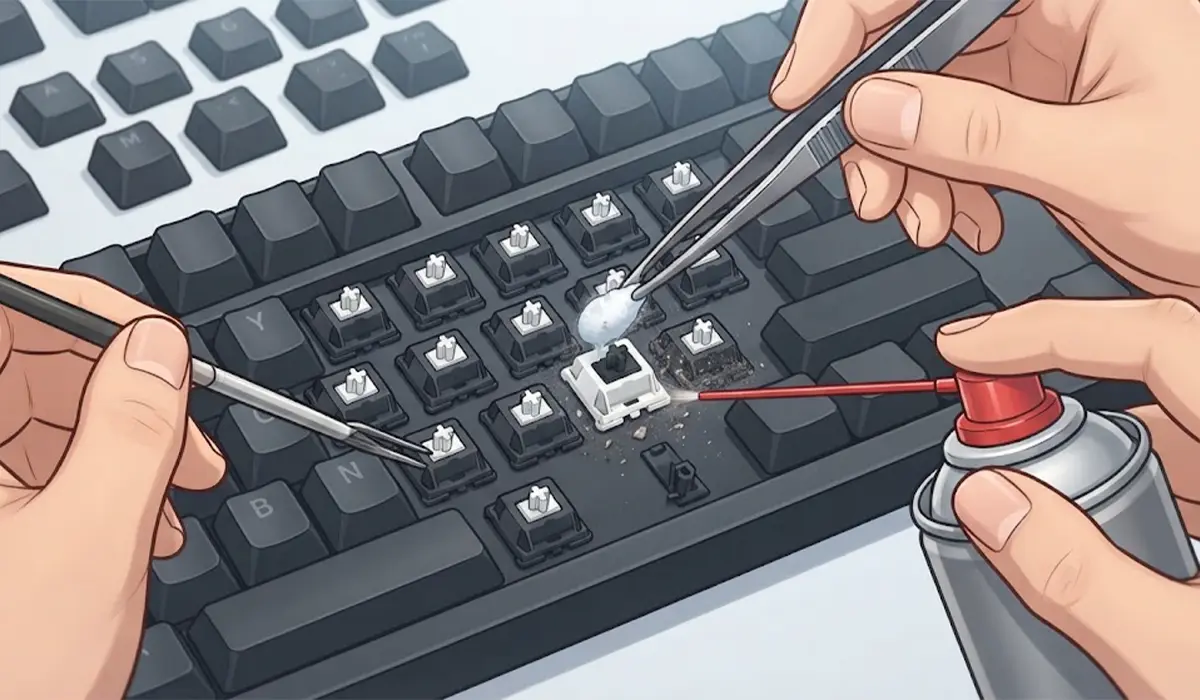
- Step 5: Clean the affected key. With the keyboard unplugged, pull the keycap straight up with the puller. Blow out the area with compressed air and sweep it with the soft brush. Dampen a cotton swab with isopropyl alcohol, wring it nearly dry, and wipe the visible switch top and the surrounding plate. Let everything dry fully before reconnecting.
- Step 6: Work the switch and retest. Refit the keycap, reconnect the keyboard, and press the key repeatedly at different speeds. Some contact dirt clears with use. If the double typing is gone across a few minutes of normal typing, the fix has likely worked.
- Step 7: Swap the switch on a hot-swap board. Use the switch puller to lift the faulty switch straight out, keeping the pins straight. Press a spare switch of the same type into the socket until it sits flush. As a diagnostic trick, move a switch from a rarely used position to the problem position. If the double typing stays at that position, the socket or circuit is at fault. If it follows the old switch, the switch itself was the problem.
- Step 8: Update or reset the firmware. Install the latest firmware from the manufacturer, then reset the keyboard to its default settings and retest before reapplying custom layouts. A corrupted layout or outdated firmware can occasionally cause repeated inputs.
Tip: Change only one thing at a time and retest after each step. Doing so shows exactly what fixed the problem, and it prevents unnecessary parts from being replaced.
When the Switch Is Soldered
On a soldered board, replacing a switch means desoldering it, fitting a new one, and soldering it back. It is a reasonable job for someone with a temperature-controlled iron and practice on spare hardware. Otherwise, a repair shop or the manufacturer is the safer route, because lifted pads on the circuit board are difficult to repair.
How to Prevent Double Typing From Coming Back
Regular upkeep keeps chatter away for much longer. Wipe the keyboard surface weekly, keep drinks away from the desk area, and blow out dust every few months with compressed air. A dust cover when the keyboard is idle also helps a great deal. Keeping a couple of spare switches on hand makes future repairs a five minute job on hot-swap boards.
Tip: Keys used constantly, such as the space bar, the vowels, and the arrow keys, usually wear first. Check these first when chatter appears.
Common Problems and Fixes
Double Typing Continues After Cleaning
The contacts inside the switch are likely worn or oxidized beyond what surface cleaning can reach. Replace the switch, or open it only if it is a type designed to be taken apart and the right tools are on hand.
Double Typing Appears on a New Switch
The switch may not be fully seated, or one of its pins may be bent. Remove it, straighten the pins carefully with tweezers, and press it in again until it is flush. If the problem stays, the socket may be damaged.
The Key Types Twice Only on Fast Presses
This is a classic sign of a debounce setting that is too low. Increase it slightly in the firmware or configuration software and retest.
Many Keys Double Type at Once
Look at software and connection causes first. Try another cable, another port, and a firmware reset. A damaged cable or a flooded circuit board can cause widespread repeated input.
Double Typing Only on One Computer
Review Windows Filter Keys, key repeat settings, and any remapping or macro utility installed on that computer. The keyboard is probably fine.
Frequently Asked Questions
What causes a mechanical keyboard to type twice?
The most common cause is a worn or dirty switch whose metal contacts open and close more than once during a single press. A debounce delay that is too short, spilled liquid, or a loose socket can also produce the same result.
Is double typing caused by software or hardware?
It can be either. Testing the keyboard on another computer is the quickest way to tell. If the problem follows the keyboard, the cause is hardware or firmware. If it stays with the computer, check accessibility and remapping settings.
Can cleaning fix mechanical keyboard double typing?
Often, yes, especially when dust, residue, or oils are the cause. Compressed air, a soft brush, and a lightly dampened swab with 90 percent or higher isopropyl alcohol clear most surface contamination around the switch.
What is debounce time and how does it help?
Debounce time is a short delay in the keyboard firmware that ignores the tiny electrical bounce when a switch closes. Raising it slightly can stop a worn switch from registering a second keystroke.
Can every mechanical keyboard change its debounce setting?
No. Boards running QMK or VIA and some models with manufacturer software offer the option, but many keyboards hide or lock the setting. The manufacturer documentation shows whether it is available.
How do I find which key is double typing?
Press each key slowly in a plain text editor or an online keyboard tester and watch for repeated characters. Noting the affected keys helps show whether one switch or the whole board is the problem.
Is it worth replacing a single switch?
Yes, on a hot-swap keyboard it is quick, inexpensive, and usually permanent. A spare switch of the same type fits straight into the socket with no soldering.
Can a hot-swap socket cause double typing?
It can. A switch that is not fully seated, or a worn socket that grips poorly, can make an unreliable connection. Reseating the switch or trying it in a different position helps confirm the cause.
Will the manufacturer cover it under warranty?
Many manufacturers do cover defective switches within the warranty period, but terms vary and opening the keyboard may affect coverage. Checking the warranty terms before disassembly is the safest approach.
