
Battery cycle count is one of the clearest signs of how much life a laptop or phone battery has left, yet most people never check it. Understanding this single number can explain sluggish battery performance, shrinking runtime, and when it finally makes sense to replace a battery instead of just charging around the problem.
Key Takeaways
- A battery cycle equals one full 100 percent discharge, even if it happens across several partial charges.
- Lithium-ion batteries are rated for a set number of cycles, typically several hundred to around a thousand, before capacity noticeably drops.
- Higher cycle counts mean lower maximum battery capacity, not a battery that suddenly stops working.
- Cycle count can be checked through built-in system tools without opening the device.
- Tracking cycle count helps decide when a battery replacement is actually worth doing.
What a Battery Cycle Actually Is
A single cycle is not the same as one charge session. It is the equivalent of discharging 100 percent of a battery’s capacity, whether that happens in one sitting or spread across multiple partial charges. Charging a laptop from 80 percent to 100 percent five times in a row, for example, eventually adds up to one full cycle once that total 100 percent has been drawn down and replaced.
This matters because most people charge their devices in short bursts throughout the day rather than running them from full to empty. A phone charged from 50 percent twice in one day still only uses about one full cycle, not two. Manufacturers count cycles this way because it reflects the real chemical wear on the battery, not just how often a charging cable gets plugged in.
Why Battery Cycle Count Matters
Every lithium-ion battery has a finite number of usable cycles built into its chemistry. Each time lithium ions move between the electrodes during charging and discharging, tiny amounts of capacity are lost permanently. This is a normal part of how these batteries work, not a defect or a sign of misuse.
As cycle count climbs, the battery’s maximum capacity – the total amount of charge it can hold – gradually shrinks. A battery rated for around 1,000 cycles will typically retain a large majority of its original capacity at that point, but the exact percentage depends on the battery chemistry, the device manufacturer’s design, and how the battery was treated along the way. This is why a two-year-old laptop with heavy daily use often needs charging more frequently than a laptop of the same age that mostly sat idle.
Tip: Runtime that keeps getting shorter even after a full charge is one of the clearest everyday symptoms of rising cycle count and capacity loss.
How to Check Battery Cycle Count
Most laptops and phones expose this information through built-in diagnostics, so there is rarely a need for third-party software.
On Windows Laptops
- Step 1: Open the Start menu, type ‘cmd’, right-click Command Prompt, and choose ‘Run as administrator’.
- Step 2: Type powercfg /batteryreport and press Enter.
- Step 3: Open the file path shown in the output using a web browser.
- Step 4: Look for the ‘Cycle count’ line near the top of the report, alongside design capacity and full charge capacity.

On MacBooks
- Step 1: Hold the Option key and click the Apple menu in the top left corner.
- Step 2: Select ‘System Information’.
- Step 3: Click ‘Power’ in the left sidebar under Hardware.
- Step 4: Find ‘Cycle Count’ listed next to battery health details.

On Smartphones
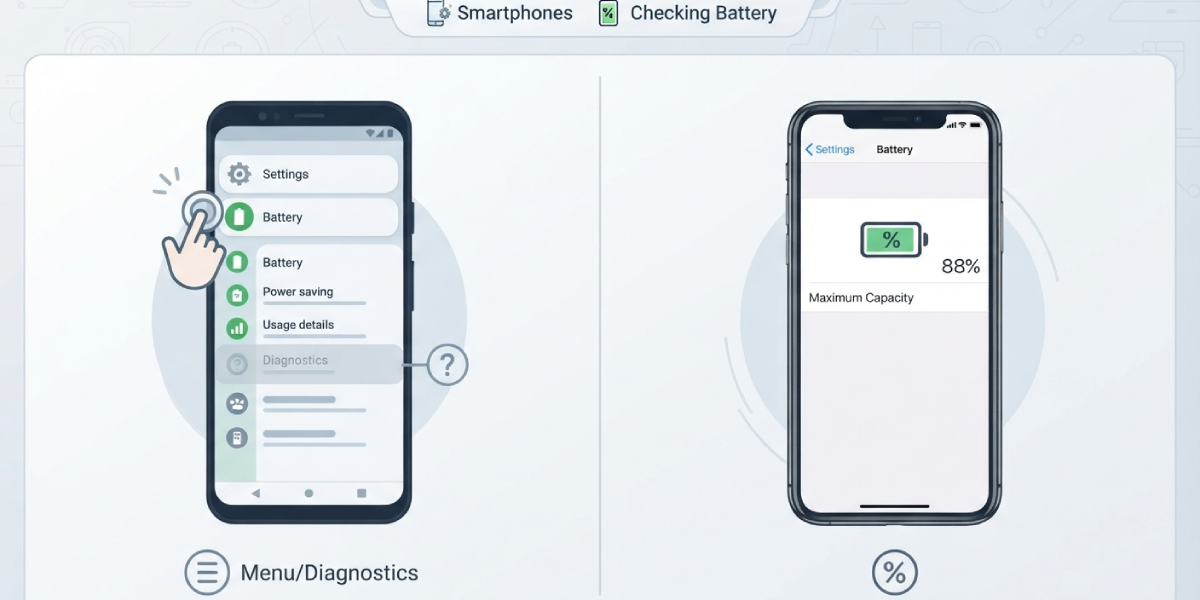
Most Android phones do not expose cycle count directly in settings, though some manufacturers include it in a battery health or diagnostics menu. iPhones show battery health as a maximum capacity percentage under Settings, Battery, Battery Health, rather than a raw cycle number.
What Counts as a High Cycle Count
Context matters more than the raw number. A cycle count of 300 on a battery rated for 1,000 cycles is still in good shape, while the same 300 cycles on a battery rated for only 500 cycles represents meaningful wear. The manufacturer’s rated cycle life, usually listed in the device’s technical specifications, is the number to compare against rather than any general rule of thumb.
Most users find that laptops used for light daily work reach a few hundred cycles over two to three years, while devices charged multiple times a day or used for demanding tasks like video editing or gaming can accumulate cycles noticeably faster.
How to Slow Down Cycle Accumulation
- Step 1: Avoid letting the battery run all the way down to 0 percent on a regular basis.
- Step 2: Keep the battery roughly between 20 percent and 80 percent for everyday use when a full charge is not needed.
- Step 3: Enable any built-in battery health or optimized charging feature the device offers, since these limit unnecessary top-offs.
- Step 4: Avoid charging in high heat, such as leaving a laptop plugged in on a bed or under direct sunlight, since heat accelerates chemical wear independent of cycle count.
- Step 5: Unplug once a laptop reaches full charge instead of leaving it connected to power for extended periods at 100 percent.
Tip: These habits slow the rate of capacity loss, but they cannot stop cycle accumulation entirely, since simply using the device requires charging and discharging.
Common Problems and Fixes
Cycle count seems high for the device’s age
This usually points to frequent full discharges or heavy daily use rather than a hardware fault. Comparing the reported full charge capacity against the design capacity in the same report gives a clearer picture of actual health than the cycle number alone.
Battery report shows a low cycle count but poor runtime
Low cycle count with poor runtime often points to a background app or process draining power rather than battery wear. Checking battery usage by app in the operating system’s settings usually identifies the cause before assuming the battery itself is failing.
Cycle count is not visible on a smartphone
Many phone manufacturers do not expose a raw cycle count in consumer settings. Maximum capacity percentage, shown on iPhones and some Android battery health apps, serves as a reliable substitute for tracking wear over time.
Cycle count keeps climbing faster than expected
Rapid cycle growth is often tied to charging habits, such as frequently draining the battery to near 0 percent or running the device on battery power under heavy load. Switching to more moderate charging habits, as outlined above, slows this down going forward, though cycles already used cannot be recovered.
Frequently Asked Questions
Is a high battery cycle count bad?
A high cycle count is not inherently bad, but it does correlate with reduced maximum battery capacity. A battery with a high cycle count relative to its rated cycle life is generally fine to keep using.
What is a normal battery cycle count for a two-year-old laptop?
This varies widely with usage patterns, but light daily use typically results in a few hundred cycles over two years. Heavier daily charging can push that number higher within the same timeframe.
Does a full battery cycle count as one cycle even with partial charges?
Yes. A cycle is based on the cumulative total of 100 percent discharged, regardless of whether that total comes from one full discharge or several smaller partial discharges added together.
Can battery cycle count be reset?
No. Cycle count reflects actual chemical wear on the battery and cannot be reset through software. Replacing the battery is the only way to restore a lower cycle count.
Does fast charging increase battery cycle count faster?
Fast charging does not add extra cycles by itself, since cycle count is based on total charge delivered rather than charging speed. Fast charging can generate more heat, though, which contributes to capacity loss over time separate from cycle count.
At what cycle count should a battery be replaced?
Replacement is usually worth considering once a battery approaches or exceeds its manufacturer-rated cycle life, or when reduced runtime starts noticeably affecting daily use. The battery report’s full charge capacity compared to design capacity gives a more precise answer than cycle count alone.
Does leaving a laptop plugged in all the time increase cycle count?
Staying plugged in at 100 percent does not add cycles by itself, since no discharge is occurring. Many laptops also include charge limiting features that stop charging once the battery is full, reducing unnecessary wear during extended plugged-in use.
Why do two laptops of the same age have different cycle counts?
Cycle count reflects usage, not age. A laptop used constantly and charged multiple times a day accumulates cycles much faster than one used occasionally, even if both devices were purchased at the same time.
Does cold weather affect battery cycle count?
Cold temperatures do not directly add cycles, but charging or heavily using a battery in very cold conditions can cause temporary performance drops and, over repeated exposure, contribute to long-term capacity loss.
