
Learning how to clean a desktop PC tower exterior properly keeps dust from building up on vents, panels, and cable connections, which helps the system breathe and look presentable on a desk or under it. A grimy case is not just a cosmetic problem – dust that cakes onto intake fans and side panels chokes off airflow before it ever reaches the internal components. This guide walks through the safe way to do it without scratching panels, damaging fans, or pushing dust further into the machine.
Key Takeaways
- Power down and unplug the tower fully before cleaning any exterior surface.
- Use compressed air or a soft brush on vents and mesh panels, not a vacuum nozzle pressed directly against them.
- Isopropyl alcohol at 90 percent or higher, applied to a cloth rather than sprayed directly, is the safest liquid cleaner for plastic and glass panels.
- Tempered glass side panels need a different approach than mesh or plastic fronts to avoid streaks and micro-scratches.
- A light cleaning every few weeks prevents the heavy dust buildup that makes deep cleaning necessary.
Before You Start
A few minutes of prep makes the whole job safer and cleaner. None of this takes long, but skipping it is how scratches and static mishaps happen.
- Shut the PC down completely and unplug the power cable from the wall or the power supply itself.
- Unplug peripheral cables and move the tower to an open, well-lit area, ideally somewhere that is not carpeted, so dust has somewhere to settle besides the floor.
- Touch a bare metal part of the case or use an anti-static wrist strap if the cleaning session will involve opening a panel, since static discharge can still affect components even during exterior work.
- Let the system cool for a few minutes if it was just running, since fans and vents near the exhaust can be warm to the touch.
Tip: cleaning outdoors or near an open window keeps blown dust from settling right back into the room.
Tools and Materials Needed
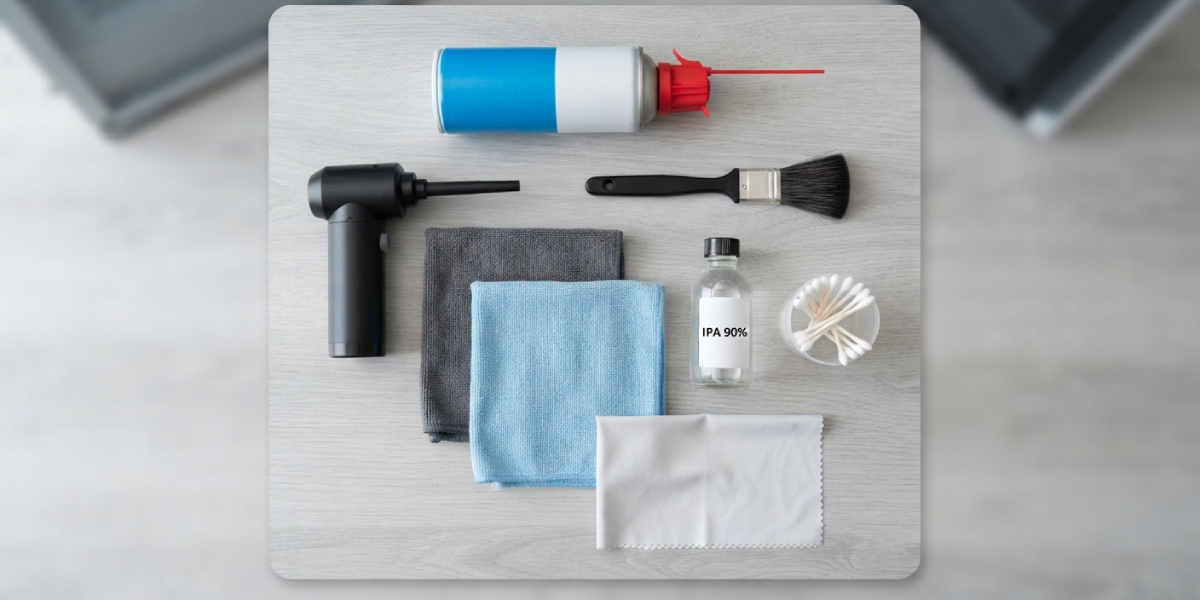
- Compressed air canister or a small electric air duster
- Soft-bristle brush, such as a clean paintbrush or a dedicated electronics brush
- Microfiber or lint-free cloths, at least two: one for cleaning, one for drying
- Isopropyl alcohol, 90 percent concentration or higher
- Cotton swabs for tight corners and seams
- A dry, soft cloth or dedicated glass cleaner made for coated glass, only for tempered glass panels
Step-by-Step: How to Clean a Desktop PC Tower Exterior
These steps cover the full outer shell of a typical mid-tower or full-tower case, including vents, panels, and front-facing ports. Working through them in order keeps loose dust from settling on surfaces already cleaned.
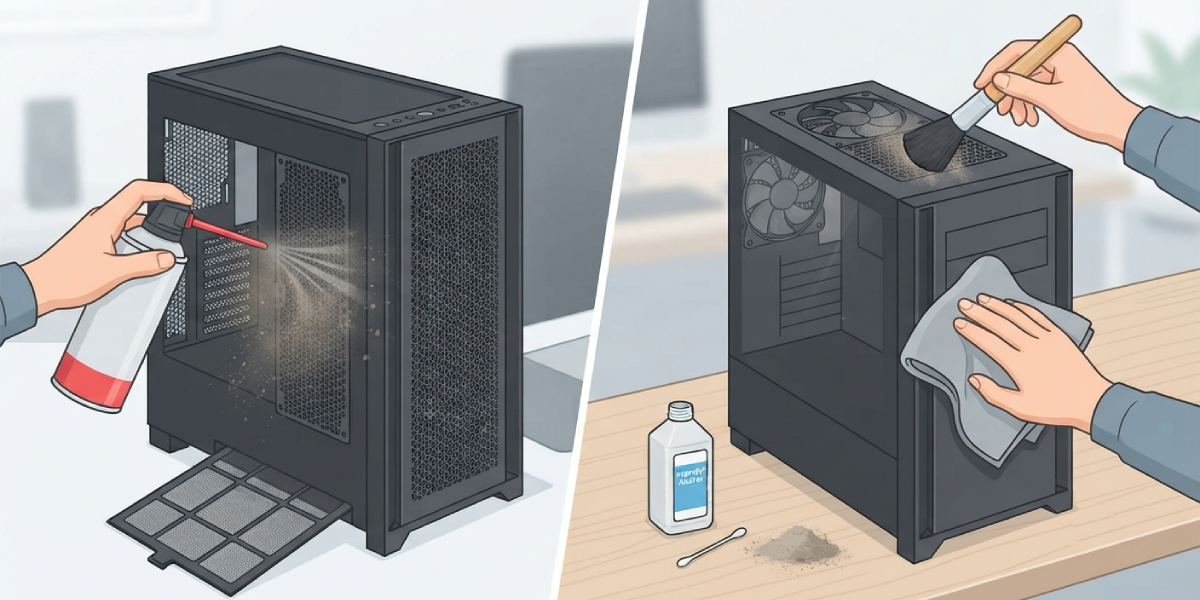
- Step 1: Blow out the dust filters first. Most towers have removable mesh filters on the front, top, or bottom. Slide them out and tap them gently over a trash can, then finish with a few short bursts of compressed air held a few inches away.
- Step 2: Address the intake and exhaust vents on the case itself. Hold the compressed air can upright and use short bursts rather than one long spray, which helps avoid moisture condensation inside the can from reaching the fans.
- Step 3: Brush off any stubborn dust clumps on vent grilles or fan blades with the soft brush before hitting them again with air. Fan blades are one of the biggest dust magnets on the entire case.
- Step 4: Dampen a microfiber cloth lightly with isopropyl alcohol, not soaking wet, and wipe down plastic and painted metal panels in straight, even strokes.
- Step 5: Clean any tempered glass panel separately with a dry microfiber cloth first to lift loose dust, then a second pass with a barely damp cloth. Avoid alcohol on glass with an anti-reflective or anti-glare coating, since some coatings react poorly to solvents.
- Step 6: Wipe down front-panel USB ports, audio jacks, and the power button area using a cotton swab lightly dampened with alcohol, working around the edges rather than pushing straight into the port opening.
- Step 7: Dry every wiped surface with a clean, dry microfiber cloth so no alcohol residue is left sitting on plastic or glass.
- Step 8: Reinstall the dust filters once fully dry, then reconnect the power cable and peripherals.
Tip: work top to bottom on the case, since dust knocked loose from upper vents will naturally fall and can be caught in a later pass on lower panels.
Cleaning RGB Panels and Accents
Cases with RGB strips or lit accents along the front or top usually have a plastic diffuser cover over the lighting. A dry brush works better than liquid cleaner here, since alcohol can occasionally dull certain plastic diffuser finishes over repeated cleanings. A quick wipe with a barely damp cloth is fine for light dust, but heavier grime is better handled with air and a brush.
How Often to Clean the Exterior
Most home environments call for an exterior wipe-down and filter clean every two to four weeks, with a more thorough pass every few months. Homes with pets, carpet, or nearby construction tend to accumulate dust faster and may need attention closer to every two weeks.
Common Problems and Fixes
A few issues tend to come up during or after cleaning a tower exterior. Most are easy to correct once the cause is clear.
- Streaks left on glass panels: This usually means too much liquid was used or the cloth had lingering dust that got dragged across the surface. Re-wipe with a clean, dry section of microfiber cloth using light pressure.
- Dust filter won’t slide back in smoothly: Check that it is fully dry and lined up with its original guide rails. Forcing a slightly damp or misaligned filter can bend the frame.
- Fans spin slowly when air is applied: This is normal and expected. Compressed air can cause fan blades to spin faster than their rated speed if held too close, so keep the can a few inches back and use short bursts instead of one continuous stream.
- Front-panel ports feel sticky or unresponsive after cleaning: This points to alcohol pooling inside the port rather than being wiped from around the edges. Let the area air dry fully for at least thirty minutes before plugging anything in.
- Case still looks dusty right after cleaning: Dust knocked loose from internal vents during the air-blowing step can resettle on the exterior within minutes. A final wipe-down after all the air and brush work usually resolves this.
Frequently Asked Questions
Can water be used to clean a PC tower exterior?
Plain water is best avoided, since it evaporates slowly and can leave streaks or seep into seams and buttons. Isopropyl alcohol at 90 percent or higher is a safer choice because it evaporates quickly and cleanly.
Is it safe to use a household vacuum on the case?
A vacuum nozzle held directly against vents or fans can generate static electricity and is not recommended for direct contact with components. Compressed air is the safer option for pulling dust out of vents and filters.
How often should the exterior of a desktop tower be cleaned?
A light cleaning every two to four weeks keeps dust from building into a heavier layer, with pet owners and dusty environments benefiting from a slightly more frequent schedule.
What is the best cloth to use on a PC case?
A microfiber or other lint-free cloth is ideal, since paper towels and regular fabric can leave lint or fine scratches on glass and painted surfaces.
Can isopropyl alcohol damage plastic case panels?
Standard plastic and painted metal panels tolerate isopropyl alcohol well when it is applied to a cloth rather than sprayed directly. Some textured or coated plastic finishes, particularly on RGB diffusers, can dull slightly with frequent alcohol use, so a dry brush is a gentler option for those parts.
Does the tower need to be unplugged to clean just the outside?
Yes, unplugging is still recommended even for surface cleaning, since it prevents accidental button presses, static-related issues, and any liquid contact near a live power connection.
Why does the front panel still look dusty after wiping it down?
Textured plastic fronts and mesh sections trap fine dust in tiny grooves that a cloth alone cannot fully lift. Following up a wipe-down with a soft brush and compressed air usually clears the remaining dust.
Can compressed air damage the fans on a case?
Holding the can too close or using one long continuous spray can cause fans to spin faster than intended, which places extra strain on the bearings. Short bursts from a few inches away avoid this risk.
Should the side panels be removed to clean the exterior?
Removing panels is not required for a routine exterior clean, but it does make wiping the inner edge of the glass and reaching tight corners along the frame easier.
Is a dust filter necessary if the case is cleaned regularly?
Dust filters are still worth keeping and cleaning, since they catch a large share of dust before it reaches internal components, which reduces how often a deeper internal cleaning is needed.
