
Knowing how to clean monitor stand and base surfaces properly keeps a workstation looking sharp and prevents dust and grime from building up in places that are easy to overlook. Most people wipe the screen regularly but ignore the stand and base until fingerprints, dust, and sticky residue have already set in. This guide walks through the safest, most effective way to get both looking new again without damaging the finish or the electronics inside.
Key Takeaways
- Power down and unplug the monitor before cleaning to avoid electrical risk and streaking from static charge.
- Use a microfiber cloth with a mild solution instead of household glass cleaner, which can strip coatings or leave residue.
- Isopropyl alcohol diluted with water handles grease and sticky spots without damaging plastic or metal finishes.
- Compressed air and a soft brush clear dust from vents, hinges, and the base without scratching anything.
- Regular light cleaning every couple of weeks prevents the heavier buildup that is harder to remove later.
Before You Start
A little prep goes a long way toward keeping this simple and safe. Skipping it is how people end up with liquid dripping into a port or a cloth that scratches instead of cleans.
- Power off the monitor and unplug it from the wall outlet, along with any video or USB cables running into the base.
- Let the monitor cool down if it has been running for a while, since warm plastic can be more sensitive to solvents.
- Move the monitor to a stable, flat surface with good lighting so every angle of the stand and base is visible.
- Gather a lint-free microfiber cloth, a soft-bristle brush, compressed air, and 70 to 90 percent isopropyl alcohol.
Tip: Never spray any liquid directly onto the monitor stand or base. Spray the cloth first, then wipe. This keeps moisture away from seams, joints, and any exposed cable connectors.
How to Clean Monitor Stand and Base Step by Step
Dust Removal First
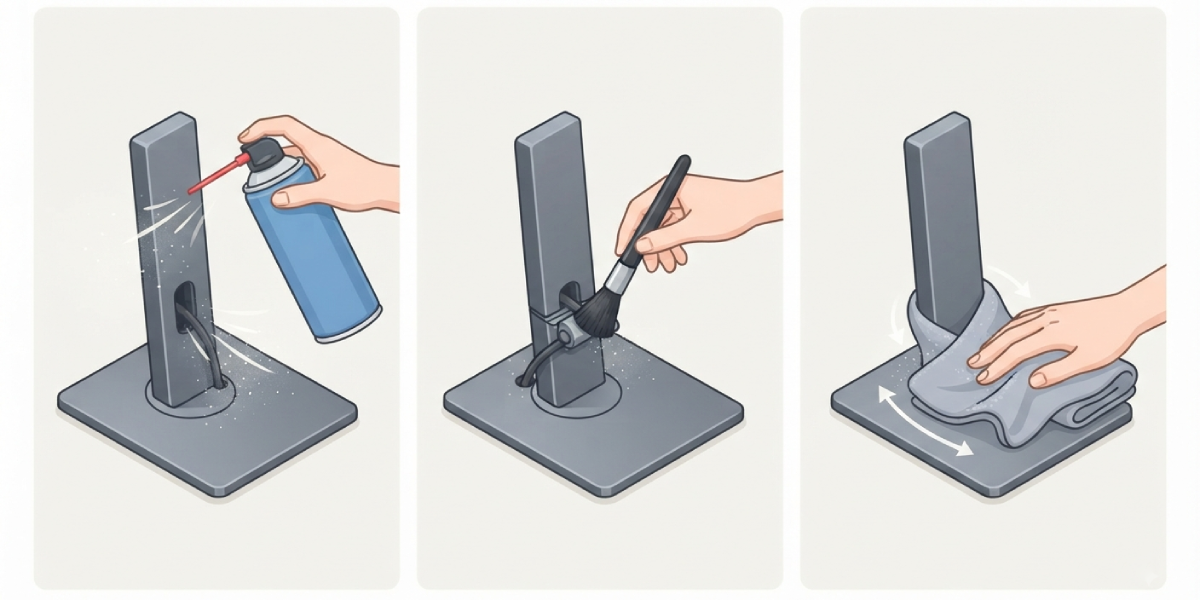
- Step 1: Use compressed air in short bursts to blow loose dust off the base, the neck of the stand, and any cable-management channels. Hold the can upright to avoid spraying moisture.
- Step 2: Run a soft brush along seams, hinges, and grooves where dust tends to collect and compressed air cannot fully reach.
- Step 3: Wipe the entire stand and base with a dry microfiber cloth to lift any remaining loose particles before introducing liquid.
Deep Cleaning the Surfaces
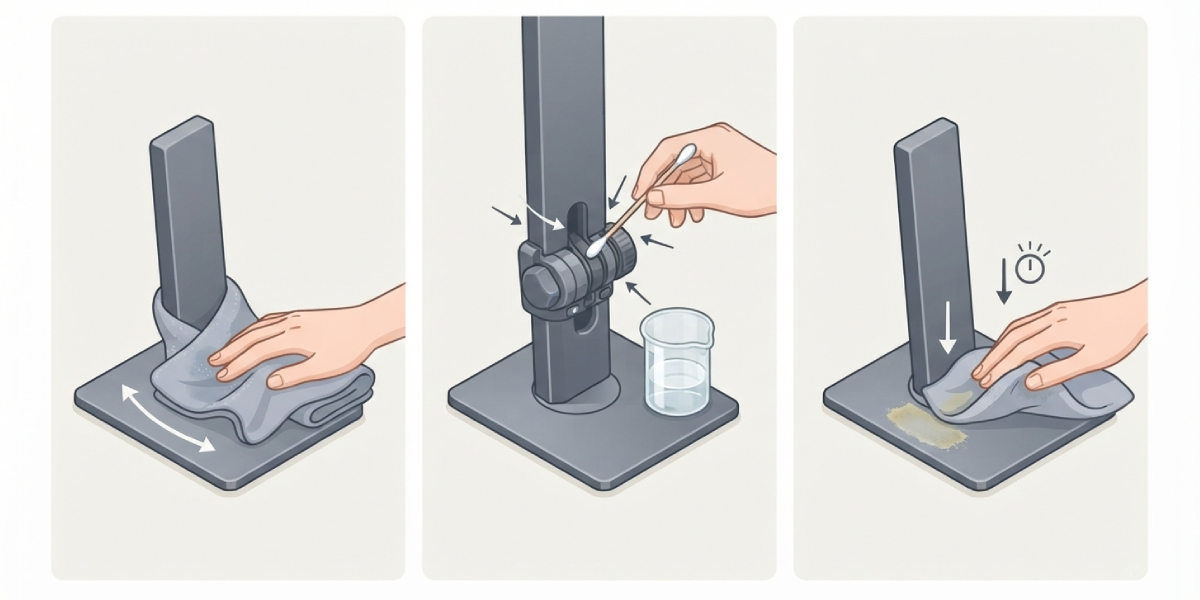
- Step 4: Dampen a fresh microfiber cloth with a mix of isopropyl alcohol and water, roughly equal parts, and wring out excess so the cloth is only slightly moist.
- Step 5: Wipe down the plastic or metal base in slow, even strokes, working from the outer edge inward to avoid pushing grime into seams.
- Step 6: Clean the stand’s neck and swivel joint carefully, using a cotton swab dipped in the alcohol solution for tight corners around adjustment knobs or buttons.
- Step 7: For sticky residue or old adhesive from labels or stickers, let the damp cloth rest on the spot for a few seconds before wiping to loosen it gradually.
Final Pass and Drying
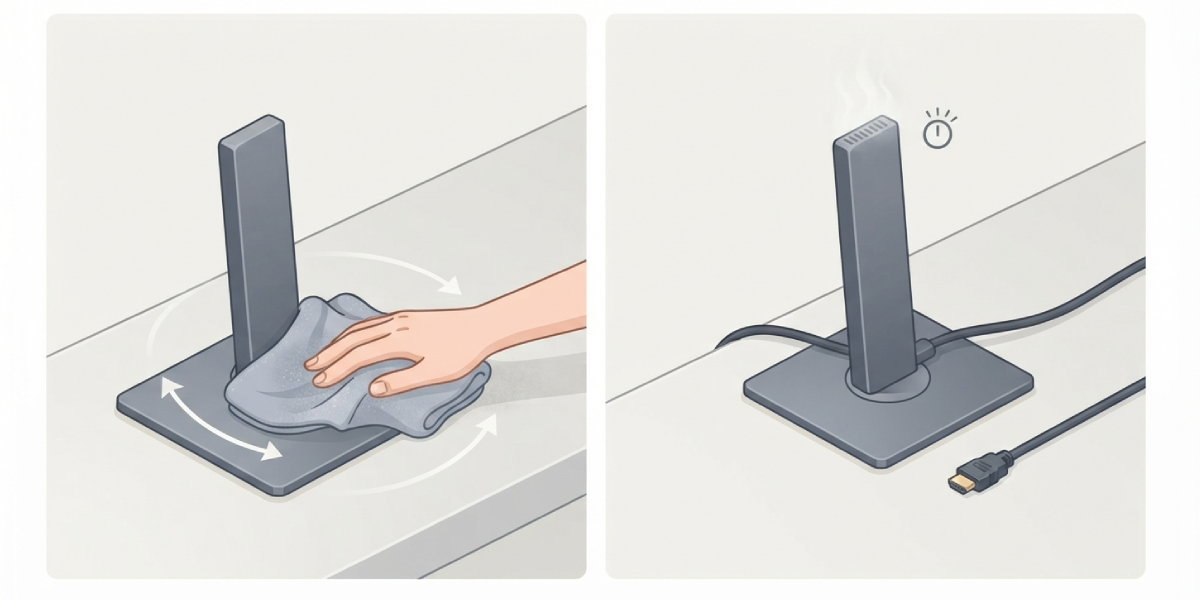
- Step 8: Wipe the entire base and stand again with a dry section of the microfiber cloth to remove any leftover moisture.
- Step 9: Leave the monitor unplugged for a few minutes to allow any trace moisture near vents or seams to fully evaporate before reconnecting cables.
Tip: A cotton swab is often more useful than a cloth for the base of the stand, since it reaches into narrow gaps around cable routing holes without leaving lint behind.
Common Problems and Fixes
Streaks or Cloudy Film After Cleaning
This usually means too much liquid was used or the cloth was not wrung out enough. A dry microfiber cloth passed over the area right after cleaning clears most streaking. If a hazy film remains on a matte-finish base, it may be residue from a cleaner that was too strong, so a lighter alcohol-to-water ratio on the next pass usually resolves it.
Stand Feels Sticky Even After Wiping
Some plastic finishes develop a naturally sticky texture over time from UV exposure or heat, separate from dirt. Alcohol will not fully reverse this, since it is a breakdown of the plastic coating itself rather than surface grime. Repeated gentle cleaning slows it down, but a stand in advanced stages of this issue may need replacement.
Swivel or Tilt Joint Feels Stiff After Cleaning
Liquid occasionally seeps into the adjustment mechanism and temporarily affects movement. Letting the joint air dry fully for an hour or two before adjusting it again usually restores normal resistance. If stiffness continues, avoid forcing the joint, since that can strain the internal tension mechanism.
Discoloration on a Matte or Textured Base
Textured plastic can trap cleaner in its pores and dry slightly lighter or darker than the surrounding area. Cleaning the entire base evenly, rather than spot-treating one section, keeps the color and finish consistent.
Frequently Asked Questions
Can glass cleaner be used on a monitor stand and base?
Standard glass cleaner often contains ammonia, which can dull plastic finishes and strip protective coatings over time. A diluted isopropyl alcohol solution is a safer, more controlled option.
How often should a monitor stand and base be cleaned?
A light dusting every one to two weeks paired with a deeper cleaning once a month keeps buildup from becoming noticeable or difficult to remove.
Is it safe to use disinfecting wipes on the base?
Most alcohol-based disinfecting wipes are safe for plastic and metal bases in moderation, but frequent use can dry out certain finishes. Checking the wipe’s alcohol concentration and using them sparingly is the safer approach.
What should be done if liquid gets into a cable port on the base?
Power should stay off and cables disconnected while the area air dries completely, ideally for several hours, before anything is plugged back in.
Can water alone be used instead of alcohol?
Water can handle light dust but struggles with grease, fingerprints, and sticky residue. Isopropyl alcohol mixed with water covers a wider range of grime without leaving extra moisture behind.
Why does the base attract so much dust compared to other furniture?
Static charge from the monitor’s electronics and nearby cables draws dust toward the base and stand more than a typical flat surface would.
Is it necessary to remove the monitor from the stand to clean it properly?
Removal is rarely necessary for routine cleaning. It is only worth considering if there is significant buildup inside a cable-routing channel that cannot be reached otherwise.
Can a magic eraser or melamine sponge be used on tough stains?
These sponges are mildly abrasive and can dull glossy plastic finishes, so they are best avoided on visible surfaces. A microfiber cloth with alcohol solution is gentler and just as effective for most stains.
What is the safest way to clean the buttons or joystick on the base?
A cotton swab lightly dampened with the alcohol solution works well around buttons, since it avoids pushing liquid into the switch housing underneath.
