
M.2 slot types like 2242, 2260, and 2280 refer to the physical length of an M.2 storage drive, and matching the right size to a motherboard or laptop slot is what makes an upgrade actually fit and work. These numbers look confusing at first glance, but once broken down, choosing the correct one becomes simple.
Key Takeaways
- The numbers in M.2 slot names (2242, 2260, 2280) describe width and length in millimeters, not speed or capacity.
- 2280 is the most common size found in desktops and most modern laptops.
- 2242 and 2260 show up mostly in compact laptops, mini PCs, and some older or thin-and-light systems.
- A drive that is too long for a slot simply will not fit, while a shorter drive may need a mounting standoff repositioned.
- Always confirm slot length in the motherboard manual or laptop teardown guide before buying a replacement drive.
What the M.2 Numbers Actually Mean
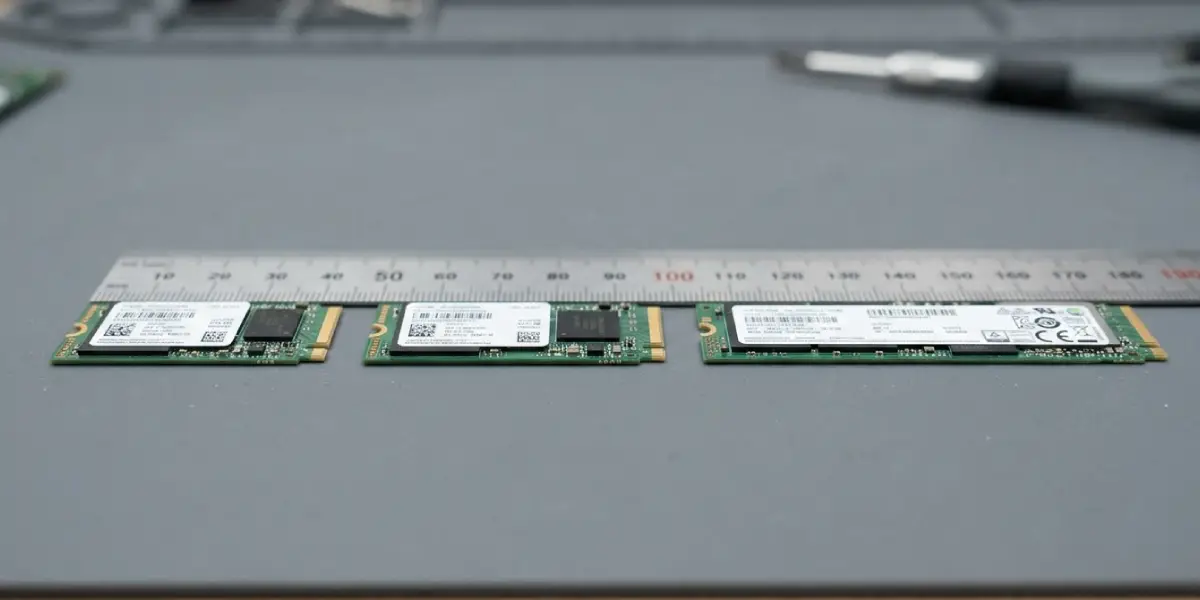
Every M.2 drive and M.2 slot type follows a naming pattern built from four or five digits. The first two digits are the width in millimeters, and the remaining digits are the length in millimeters. So a drive labeled 2280 is 22mm wide and 80mm long. A 2242 drive is that same 22mm width but only 42mm long, and a 2260 drive lands in between at 60mm.
Width almost never changes across consumer drives, since 22mm is the standard for practically every M.2 SSD sold today. Length is the variable that actually determines whether a drive physically fits a given slot, and it is the number most people run into trouble with when upgrading storage.
Tip: When shopping for a replacement SSD, search by the exact four-digit code (2242, 2260, or 2280) rather than just ‘M.2’, since M.2 alone does not guarantee a length match.
Breaking Down Each M.2 Slot Type
M.2 2242
This is the shortest common size, measuring 22mm by 42mm. It shows up in ultra-compact laptops, some tablets with keyboard docks, and small form factor mini PCs where board space is tight. Capacity options tend to be smaller than longer drives simply because there is less room for NAND flash chips on the board.
M.2 2260
At 22mm by 60mm, this size sits as a middle ground. It is less common than the other two, but it does appear in certain business laptops and some older desktop motherboards that included a shorter mounting point specifically for this length. A 2260 slot can usually also accept a 2242 drive if the standoff is repositioned, since most modern motherboards include multiple standoff holes.
M.2 2280
This is the size most people encounter. At 22mm by 80mm, it is the default length for the vast majority of desktop motherboards and most full-size laptops. Nearly every mainstream consumer SSD, from budget drives to high-performance NVMe models, ships in this length because it offers enough surface area for higher capacities without becoming unwieldy.
How to Check Which M.2 Slot Type a Device Uses
- Step 1: Check the motherboard or laptop manufacturer’s product page or manual, which usually lists supported M.2 lengths directly next to the storage specifications.
- Step 2: Look at the standoff screw position on the motherboard or laptop chassis, since the mounting hole location corresponds to a specific length (a hole at the 42mm mark supports 2242, and so on).
- Step 3: If multiple standoff holes are present near the slot, check whether the board supports more than one length, which is common on many desktop boards.
- Step 4: For laptops, search the exact model number along with ‘teardown’ or ‘SSD upgrade’ to find confirmation from someone who has physically opened that model before.
- Step 5: Measure an existing drive if one is already installed, using a ruler or caliper from the connector edge to the far tip of the board.
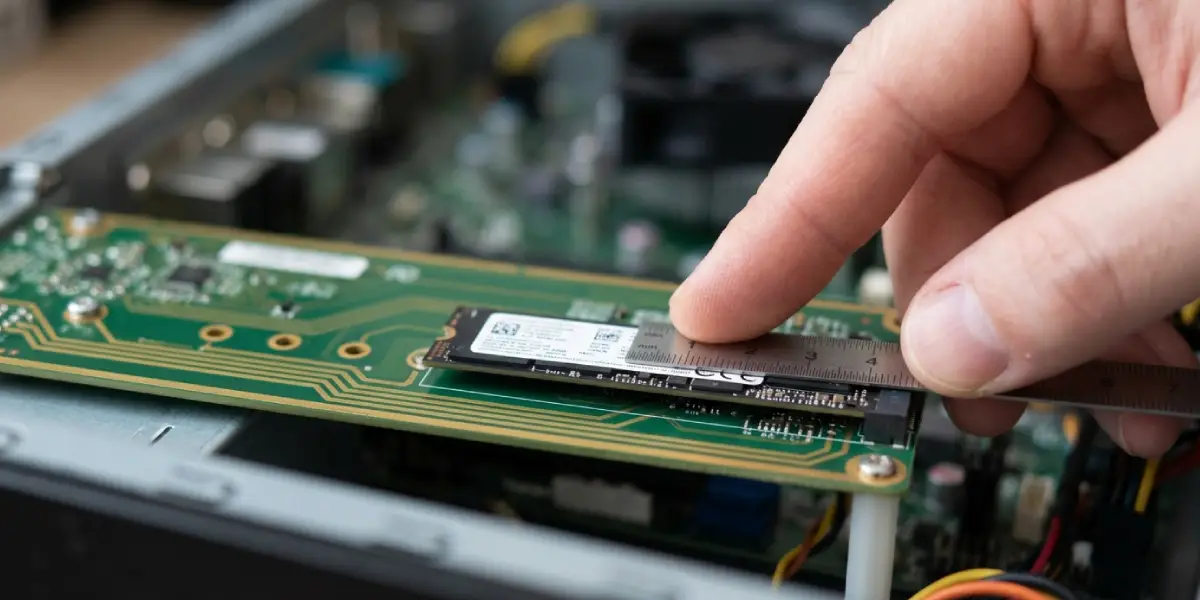
Tip: A drive that looks like it might fit is not the same as one confirmed to fit. Length mismatches are one of the most common return reasons for M.2 SSD purchases.
Common Problems and Fixes
- Drive does not physically reach the mounting screw: This means the drive is shorter than the slot’s default standoff position. Move the standoff screw to the matching hole for that drive’s length, if the board offers one.
- Drive is too long to sit flat in the slot: The drive exceeds the maximum length the slot supports. There is no safe workaround here; a shorter drive matching the slot’s rated length is required.
- System does not detect the drive after installation: Length was correct, but the drive was not seated at the proper angle before screwing it down, or the connector was not fully inserted. Reseat the drive at roughly a 30-degree angle, press it flat, then secure the screw.
- Laptop slot only accepts a shorter length than expected: Some compact laptops are hard-limited to 2242 or 2260 slots by chassis design, with no way to fit a longer drive regardless of standoff position. Confirming the exact supported length before purchase avoids this issue entirely.
Frequently Asked Questions
What do the numbers in M.2 2280 actually stand for?
The first two digits represent the drive’s width in millimeters, and the remaining digits represent its length. 2280 means 22mm wide and 80mm long.
Is M.2 2280 the same as NVMe?
No. 2280 describes physical size only, while NVMe describes the communication protocol a drive uses. An M.2 2280 drive can be either NVMe or SATA, so the form factor and the interface are two separate specifications.
Can a 2242 drive fit in a 2280 slot?
Yes, as long as the board has a standoff hole positioned for the shorter length. Many desktop motherboards include multiple mounting points specifically to support shorter drives in a slot rated for 2280.
Can a 2280 drive fit in a slot rated for 2242 or 2260?
No. A longer drive cannot be shortened or bent to fit a smaller mounting space, so the slot’s maximum supported length sets a hard limit.
Why do some laptops only support 2242 drives?
Thin and compact laptop designs often prioritize internal space savings, so manufacturers use the physically smallest reliable M.2 slot type that meets their storage needs.
Does a shorter M.2 drive mean slower performance?
Not inherently. Speed depends on the drive’s controller and interface (SATA vs NVMe, and which PCIe generation it uses), not its physical length. Shorter drives simply tend to top out at lower maximum capacities.
How can slot length be confirmed without opening the device?
Manufacturer specification sheets, support documentation, or official teardown and upgrade guides for the exact model typically list the supported M.2 length.
Are there M.2 slot types longer than 2280?
Yes, sizes like 22110 exist, measuring 22mm by 110mm, though they are far less common and mostly appear in workstation or server-oriented boards designed for enterprise storage.
Does the M.2 slot type affect compatibility with M.2 Wi-Fi cards?
M.2 Wi-Fi cards use their own common size, typically 2230, and are keyed differently from storage drives, so an M.2 storage slot and an M.2 Wi-Fi slot are not interchangeable even though both use the M.2 standard.
What happens if the wrong length drive is ordered by mistake?
It simply will not mount correctly in the intended slot. Most retailers accept returns or exchanges for this, so checking the supported length before purchase is the easiest way to avoid the hassle altogether.
