
What is a surge protector and do you need one for a PC or laptop? A surge protector is a power strip with built-in circuitry that diverts sudden voltage spikes away from plugged-in devices. For any desktop PC, and for most laptops that spend time plugged in, the answer is yes. It costs very little compared with replacing a fried power supply, motherboard, or monitor.
Key Takeaways
- A surge protector diverts excess voltage to the ground wire, while a plain power strip only adds extra outlets.
- Desktop PCs, monitors, routers, and other electronics benefit most, and laptops are worth protecting when they sit plugged in for long periods.
- Look for a recognized safety listing such as UL 1449, a clearly printed joule rating, and a low voltage protection rating.
- Protection wears out over time, so replace the unit after a major surge or when its protection indicator light goes off.
- A UPS (uninterruptible power supply) is the better choice when power cuts and unsaved work are a concern.
What Is a Surge Protector and Do You Need One?
The short answer is that most people with a PC, laptop, monitor, or home network gear should use one. Household electricity is meant to arrive at a steady voltage, but that steadiness is not guaranteed. A surge is a brief jump above the normal level. It can come from a lightning strike near the power lines, switching on the utility grid, large appliances such as air conditioners and refrigerators cycling on and off, or power returning after an outage.
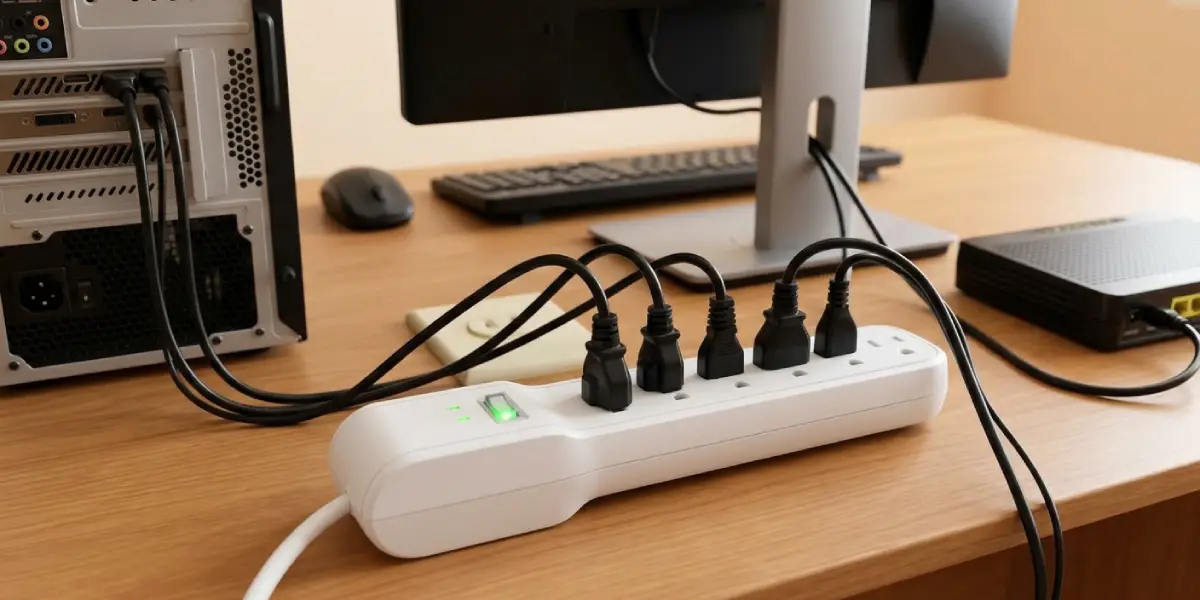
Surge damage is not always dramatic. A big spike can kill a power supply outright. A smaller one can damage a component that fails later, which makes the cause hard to trace. That is why a cheap layer of protection between the wall and the hardware is such an easy decision.
How a Surge Protector Works
Inside a typical surge protector sit components called metal oxide varistors, or MOVs. Under normal voltage they do almost nothing. When the voltage climbs past a set threshold, they become conductive and redirect the extra energy to the ground wire. Think of a pressure relief valve on a boiler: it stays shut until the pressure gets dangerous, then vents the excess safely.
Two details matter here. First, the ground connection is what makes the whole system work, so the outlet must be properly grounded. Second, MOVs wear down each time they absorb a surge. A surge protector is a consumable part, not a permanent one.
Do Desktop PCs Need a Surge Protector?
Yes. A desktop PC is connected to the wall through its power supply, and everything else in the case sits behind that single part. Many power supplies include some input and overvoltage protection, but that is a last line of defense rather than a replacement for a dedicated surge protector. A strong spike can still damage the power supply and take other components with it. Monitors, speakers, printers, and external drives plugged into the same outlet are exposed too.
Do Laptops Need a Surge Protector?
Laptops are a little different, but protection is still worth it. A laptop running on battery and unplugged is isolated from the wall. Once it is plugged in, though, the power adapter connects directly to the outlet and sees any surge first. Most people find that the adapter is the part at risk, along with any dock, monitor, or external drive sharing the same outlet.
This works best when the laptop lives at a desk and stays plugged in most of the day. During a severe storm, unplugging the adapter is the surest defense of all.
Other Devices Worth Protecting
- Routers and modems, which are exposed through both the power outlet and the incoming cable or phone line.
- Network storage (NAS) units and external hard drives.
- Gaming consoles, monitors, and TVs.
- Printers and other office electronics that share a desk setup with a PC.
Surges can also travel through coaxial, Ethernet, and telephone lines. If a cable line enters the house and connects to a modem or router, a surge protector with matching pass-through ports covers that route as well.
Surge Protector vs Power Strip vs UPS
These three are easy to mix up because they often look alike. The difference is in what happens inside.
Power Strip
A basic power strip only turns one outlet into several. It has no circuitry to limit voltage spikes. Some look identical to a surge protector, so check the label and packaging. If there is no joule rating and no safety listing for surge protection, treat it as a plain power strip.
Surge Protector
A surge protector adds the voltage-limiting components described above. It handles spikes, but it does nothing when the power simply goes out.
UPS (Uninterruptible Power Supply)
A UPS contains a battery. When the power cuts, it keeps devices running long enough to save work and shut down properly. Most models also include surge protection, and line-interactive units commonly add automatic voltage regulation for brownouts and low-voltage conditions. A UPS makes the most sense for desktop PCs, NAS drives, and any setup where a sudden shutdown could corrupt files or damage a drive. In areas with frequent outages or unstable voltage, a UPS is usually the smarter buy than a surge protector alone.
What to Look for When Choosing a Surge Protector
- Safety listing: look for UL 1449 or an equivalent recognized safety certification for the local region. This shows the unit has been tested as a surge protective device.
- Joule rating: this indicates how much energy the unit can absorb over its life. Higher is better, so compare figures between similarly priced models.
- Voltage protection rating (clamping voltage): this is the voltage level at which the unit starts diverting a surge. Lower is better, and common ratings include 330V and 400V.
- Indicator lights: a protected light shows the surge circuitry is still working, and a grounded light shows the outlet is wired correctly.
- Load rating: the total draw of everything plugged in must stay within the strip’s rated capacity.
- Outlet spacing: bulky power adapters can block neighboring sockets, so widely spaced or rotating outlets help.
- Data line ports: coaxial or Ethernet pass-through is useful when a modem or router is part of the setup.
- Connected equipment warranty: some manufacturers offer one, but the terms are strict, so read them before relying on it.
Tip: Skip any strip that does not list a joule rating and a safety listing. Vague marketing phrases like ‘surge-ready’ are not a substitute for real numbers on the label.
Before You Start
No special tools are needed, since this is a plug-in job. A few quick checks keep it safe.
- Turn off and unplug the devices being moved before rearranging cables.
- Confirm the wall outlet is a grounded, three-prong type and is not loose, discolored, or warm to the touch.
- Inspect the surge protector’s cord and plug for cracks or bent prongs.
- Never open the surge protector casing. There are no user-serviceable parts inside.
If the outlet is loose, scorched, or not grounded, stop and call a licensed electrician. A surge protector cannot do its job without a proper ground.
How to Set Up a Surge Protector Correctly
The key is to get the order and placement right. A good unit plugged in badly delivers a fraction of its protection.
- Step 1: Power down the PC, monitor, and other devices, then unplug them from their old outlets or strips.
- Step 2: Plug the surge protector directly into a grounded wall outlet. Never connect it to an extension cord or another power strip.
- Step 3: Check the indicator lights. The protected and grounded lights should both be on before anything else is connected.
- Step 4: Plug in the PC, monitor, and other devices, keeping the total load within the strip’s rating. Keep high-draw items such as space heaters off the strip entirely.
- Step 5: If the unit has coaxial, Ethernet, or phone ports, route the modem or router data line through them.
- Step 6: Place the strip where air can move around it, away from heat sources and not buried under rugs, cushions, or clutter.
- Step 7: Switch the surge protector on, then power up the devices and confirm everything runs normally.
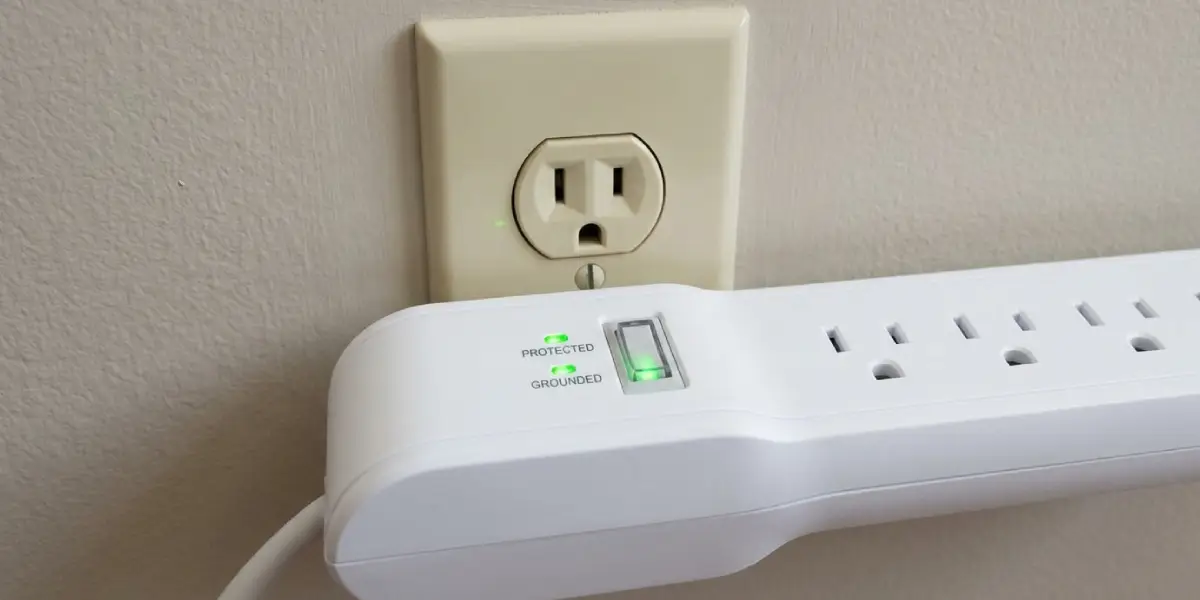
Tip: Write the purchase date on the back or underside of the surge protector with a permanent marker. It makes the replacement schedule easy to track.
When to Replace a Surge Protector
Because the MOVs wear out, a surge protector is not a buy-once item. Replace it when the protected indicator light goes out or starts blinking, since the unit may keep supplying power with no protection left. Replace it after a major surge or a nearby lightning strike, even if it looks fine. Also retire it if there is any sign of heat damage, burn marks, a burning smell, or plugs that no longer grip firmly. Many manufacturers also suggest replacing units every few years as a precaution.
Common Problems and Fixes
The Protected Light Is Off or Blinking
The surge protection circuitry has worn out or failed. The outlets may still deliver power, but the protection is gone. Replace the unit.
The Grounded Light Is Off
The wall outlet is not properly grounded or is wired incorrectly. Stop using the strip for valuable equipment and have a licensed electrician inspect the outlet. Ground-lifting adapters are not a fix.
The Strip Feels Hot or the Breaker Trips
The strip is likely overloaded. Unplug high-draw appliances and spread the devices across more than one properly rated protector or outlet. If the strip stays hot with a normal load, replace it.
Devices Were Damaged Even With a Surge Protector
Possible causes include a worn-out unit, a missing ground, a surge that entered through an unprotected coaxial, Ethernet, or phone line, or a strike too large for any strip. Replace the unit, protect the data lines as well, and check whether the manufacturer’s connected equipment warranty applies.
A Buzzing Sound or Burning Smell Comes From the Strip
Unplug it right away, if it is safe to do so, and do not use it again. Discard the unit and replace it.
Bulky Adapters Block Neighboring Outlets
Use a surge protector with widely spaced or rotating outlets. Avoid stacking plug splitters onto the strip, since that adds strain and reduces reliability.
Frequently Asked Questions
What is a surge protector in simple terms?
A surge protector is a power strip with protective components inside, usually metal oxide varistors, that divert sudden voltage spikes to the ground wire instead of letting them reach plugged-in devices. A basic power strip only adds outlets and does nothing to block spikes.
Do you need a surge protector for a laptop?
In most cases, yes. A laptop that spends its time plugged in at a desk is exposed through its power adapter, which connects directly to the wall outlet and sees any surge first. A surge protector is a low-cost way to protect the adapter, the laptop, and any monitor or dock connected to the same outlet.
Is a surge protector the same as a power strip?
No. A power strip only multiplies outlets. A surge protector adds circuitry that limits voltage spikes and is normally labeled with a joule rating and a safety listing such as UL 1449. If the packaging mentions neither, treat it as a plain power strip.
Can a surge protector stop lightning damage?
It helps with surges caused by nearby strikes and grid disturbances, but no surge protector can promise to survive a direct lightning strike. During a severe storm, unplugging valuable equipment, including network and coax cables, is the safest step.
How long does a surge protector last?
There is no fixed lifespan, because protection wears down with every surge absorbed. Replace the unit when its protected indicator light goes out, after a major surge or nearby lightning strike, or if it shows heat damage, burn marks, or loose outlets. Many manufacturers also suggest replacing it every few years as a precaution.
What is the difference between a surge protector and a UPS?
A surge protector only limits voltage spikes. A UPS contains a battery that keeps devices running during a power cut, gives time to save work and shut down, and most models include surge protection as well. A UPS suits desktop PCs, NAS drives, and other setups where sudden shutdowns cause problems.
Does a PC power supply already include surge protection?
Many power supplies include some input protection and overvoltage protection, but that is a last line of defense rather than a replacement for a dedicated surge protector. A strong spike can still damage the power supply and take other parts with it.
Can you plug a surge protector into another power strip or an extension cord?
No. Chaining strips together, or plugging a surge protector into an extension cord, can overload the circuit and creates a fire risk. The protector should go directly into a grounded wall outlet. If more outlets are needed, buy a single surge protector with enough sockets.
