
What is ECC RAM and do you need it? ECC stands for Error-Correcting Code, and it is a type of memory that detects and fixes small data errors before they can crash a system or corrupt a file. For most gaming PCs and everyday laptops the answer is no, but for servers, workstations, and data-critical builds it can be a smart requirement.
Key Takeaways
- ECC RAM adds extra check bits to every chunk of data so single-bit errors are corrected automatically and larger errors are flagged.
- Most home PCs, gaming rigs, and standard laptops do not need ECC memory.
- ECC only works when the CPU, motherboard, and memory modules all support it.
- Servers, NAS builds, workstations, and long-running calculations benefit the most.
- DDR5 on-die ECC is not the same thing as full ECC memory.
What Is ECC RAM and How Does It Work?
Memory stores data as tiny electrical charges, and every so often one of those bits flips from 0 to 1 or the other way around. Electrical noise, heat, and background radiation can all cause it. In a normal system, a flipped bit may go unnoticed, or it may crash a program, damage a saved file, or freeze the whole machine.
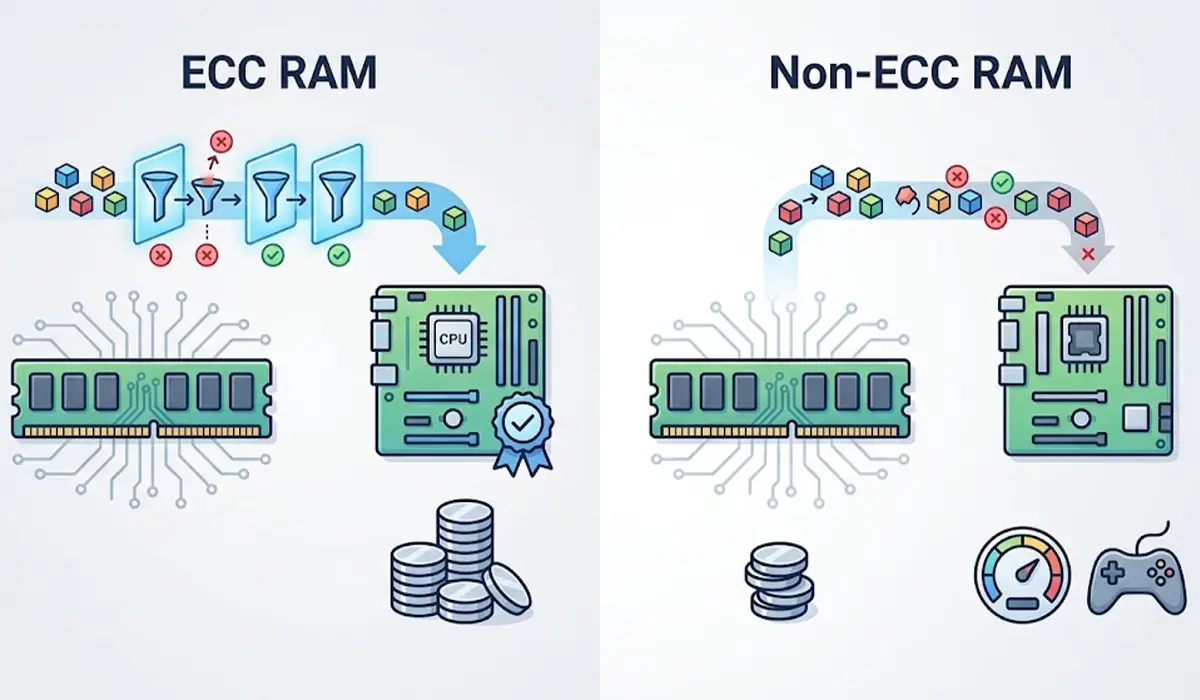
ECC RAM guards against this by storing extra check bits alongside the data. A standard ECC module is 72 bits wide instead of 64, with the extra 8 bits used for error checking. Think of it like a proofreader reading each page as it is written: a single typo gets fixed on the spot, and a bigger mistake gets flagged so the system knows something is wrong.
What ECC Can and Cannot Do
- It corrects single-bit errors automatically, with no action from the user.
- It detects double-bit errors, which cannot be corrected, so the system can log the problem or halt instead of continuing with bad data.
- It does not fix a failing memory module, bad drivers, or software bugs.
- It does not make memory faster. ECC systems are often a little slower than comparable non-ECC systems because of the extra checking.
ECC vs Non-ECC RAM: The Practical Differences
- Reliability: ECC catches and corrects memory errors, while non-ECC RAM passes them along silently.
- Compatibility: ECC needs a supporting CPU and motherboard. Non-ECC RAM works in nearly every consumer system.
- Cost: ECC modules generally cost more than comparable non-ECC modules, and the choice of ECC-capable platforms is narrower.
- Speed and options: Non-ECC kits offer far more overclocking and high-speed gaming options, which ECC modules rarely target.
Unbuffered, Registered, and Fully Buffered Types
ECC comes in more than one module style. Unbuffered ECC (ECC UDIMM) is the version used in some workstations and a few desktop boards. Registered ECC (RDIMM) is common in servers and high-end workstations and cannot be mixed with unbuffered modules. A motherboard supports one style or the other, so the manual or the manufacturer’s memory support list should be checked before buying anything.
ECC RAM in Laptops
Standard consumer laptops do not support ECC memory. It is mostly found in mobile workstations built around workstation-class processors. A laptop that supports ECC will say so in its official specifications, so the model’s spec sheet is the only reliable place to confirm it.
Do You Need ECC RAM? A Simple Decision Guide
You Probably Do Not Need ECC If…
- The PC is used for gaming, browsing, streaming, office work, or general home use.
- Video editing or photo editing is done as a hobby, with regular backups.
- The system is a typical laptop or all-in-one.
- A rare crash would be an annoyance rather than a serious loss.

You Should Seriously Consider ECC If…
- The machine is a server or a file server that runs around the clock.
- A NAS is storing important data, especially with a file system such as ZFS that is designed to work well with ECC memory.
- Scientific, engineering, financial, or database work is done where one flipped bit could quietly spoil results.
- The workstation handles long renders or simulations that run for many hours or days.
- A virtualization host runs several virtual machines on one system.
Tip: The risk of a memory error grows with the amount of RAM and the time a system stays powered on. A server that never turns off and holds large amounts of memory benefits far more from ECC than a laptop used a few hours a day.
How to Check Whether a PC Supports or Uses ECC RAM
Support depends on the whole platform, not just the memory stick. Many workstation and server processors support ECC, some professional-grade desktop processors do, and the motherboard must also be built to use it. Plain consumer chipsets often do not. Following these checks avoids buying memory that cannot work as intended.
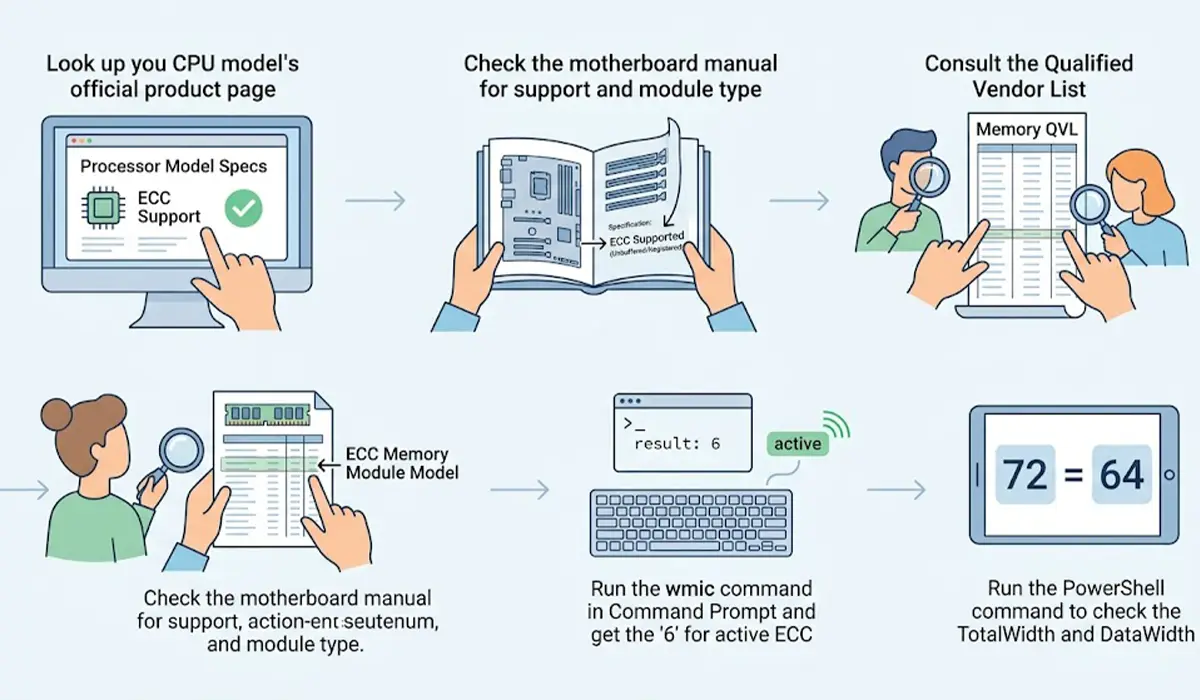
- Step 1: Look up the exact CPU model on the manufacturer’s official product page and confirm that ECC memory is listed as supported.
- Step 2: Open the motherboard manual or product page and confirm ECC support, along with the type of module it takes (unbuffered or registered).
- Step 3: Check the motherboard’s memory support list, often called a QVL, for the exact ECC module or a module from the same family.
- Step 4: After installing the memory, open Command Prompt and type wmic memphysical get memoryerrorcorrection. A result of 6 means ECC is reported as active, while 3 means no error correction.
- Step 5: For a second check, open PowerShell and run Get-CimInstance Win32_PhysicalMemory | Select-Object TotalWidth, DataWidth. A total width of 72 with a data width of 64 points to ECC modules.
Tip: A BIOS or UEFI setting for ECC mode, where one exists, is worth checking. On some boards, ECC modules will install and run but the error-correcting feature may need to be switched on or confirmed in firmware.
DDR5 On-Die ECC vs Real ECC
Every DDR5 memory chip includes a form of on-die ECC. It corrects errors inside the chip itself, which helps the chips remain reliable at high densities and speeds. It does not check the data as it travels between the memory and the processor, so it does not give the full-path protection of true ECC modules. A standard DDR5 kit is still non-ECC memory at the system level, despite the on-die feature.
Common Problems and Fixes
The System Will Not Boot With ECC RAM Installed
The most common cause is an unsupported platform. Confirm that the CPU and motherboard both support the module type installed. Registered modules will not work in a board built for unbuffered memory, and the reverse is also true. Reseat the module firmly, and update the motherboard BIOS if the manual lists it as required for ECC support.
ECC Modules Run but Error Correction Is Not Active
Some boards accept ECC modules but run them without error correction when the platform does not fully support it. Run the checks from the section above to confirm the real status, and look for an ECC option in BIOS. If the CPU or board does not support ECC, only a platform change will enable it.
Corrected Errors Appear in the System Logs
A few corrected errors over a long period are normal, and that is the feature doing its job. A steady stream of corrected errors from the same module is a warning sign. Reseat the module, test it in another slot, and run a memory diagnostic. If errors continue, replace the module before it starts producing errors that cannot be corrected.
Uncorrectable Errors or Random Shutdowns on an ECC System
Uncorrectable errors mean the module, slot, or memory controller is failing or being pushed outside its limits. Remove modules one at a time to find the faulty one, and return any custom memory settings to default. A module that keeps failing should be replaced rather than kept in service.
Frequently Asked Questions
What does ECC stand for in RAM?
ECC stands for Error-Correcting Code. It refers to extra check data stored with each chunk of memory so single-bit errors can be fixed automatically and larger errors can be detected.
Do gamers need ECC RAM?
No. Gaming PCs do not benefit meaningfully from ECC, and non-ECC kits offer more speed options and wider compatibility. A memory error in a game is rare and usually costs nothing more than a restart.
Can ECC RAM be used in any motherboard?
No. ECC memory needs support from both the CPU and the motherboard. Some boards will run ECC modules as ordinary memory without error correction, while others will not boot at all, so the manual and memory support list should be checked first.
Is ECC RAM faster than regular RAM?
No. ECC is about data integrity, not speed. The error-checking process can make an ECC system slightly slower than a comparable non-ECC one.
Can ECC and non-ECC RAM be mixed?
Mixing them is not recommended. Where a board accepts both, the system generally cannot provide full error correction, and compatibility depends on the motherboard design. The safest setup is a matched set of the same module type.
Is DDR5 on-die ECC the same as ECC RAM?
No. On-die ECC corrects errors only inside the memory chip, while true ECC memory also protects data as it moves between the module and the processor. A standard DDR5 kit is still considered non-ECC memory at the system level.
Do laptops support ECC RAM?
Most laptops do not. ECC is mostly found in mobile workstations with workstation-class processors, and the official spec sheet of the specific model is the place to confirm support.
How can ECC RAM be checked in Windows?
Open Command Prompt and run wmic memphysical get memoryerrorcorrection. A value of 6 indicates ECC is reported as active, and a value of 3 indicates no error correction.
Does ECC RAM prevent all crashes?
No. ECC protects against memory bit errors only. Crashes caused by drivers, software bugs, overheating, a failing drive, or a faulty power supply are not prevented by ECC.
Is ECC RAM worth it for a home NAS?
For a NAS that stores important or irreplaceable data, ECC is a sensible choice, especially with file systems like ZFS that are designed to work well with it. For a casual media server with backups, non-ECC memory is generally acceptable.
