
A laptop turning off at 20% battery instead of running down to zero usually points to a battery that can no longer deliver steady power under load, or to a Windows power setting that is stepping in too early. The good news is that most cases can be diagnosed and fixed without opening the laptop at all.
Key Takeaways
- Sudden shutdowns above 0% almost always trace back to battery wear, voltage sag under load, or a critical battery action set too aggressively.
- Checking the battery report built into Windows is the fastest way to confirm whether the battery itself is the problem.
- Adjusting critical battery level settings and updating drivers solves this for a large share of affected laptops.
- A battery that fails a health check or shows a low full charge capacity generally needs to be replaced, not reconditioned.
- Cold environments and heavy CPU or GPU loads make the shutdown happen sooner and more often.
Common Causes of a Laptop Shutting Down at 20% Battery
Battery Wear and Voltage Sag
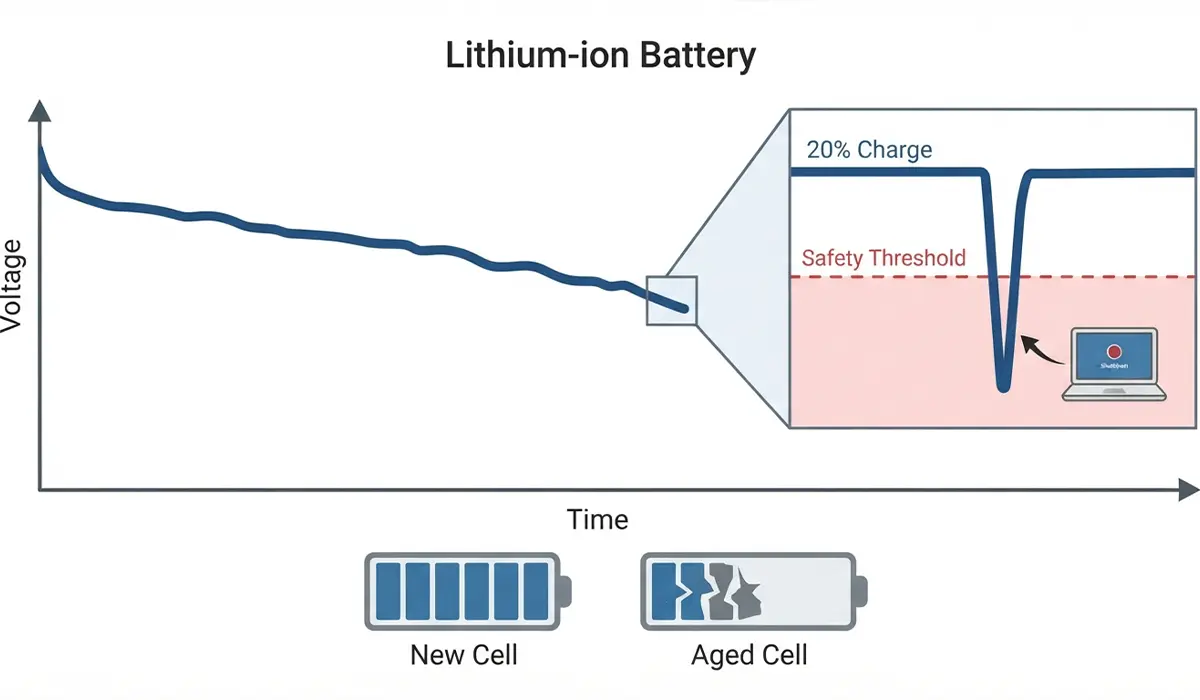
Every lithium-ion battery loses capacity over time, and the drop is not always smooth. As the cells age, their ability to hold voltage under a sudden load weakens. When the CPU spikes during a demanding task, the voltage can sag briefly below the point Windows considers safe, even though the reported charge still says 20%. The system reads that sag as an imminent power failure and shuts down to protect itself.
Inaccurate Battery Reporting
The percentage shown in the taskbar is an estimate based on voltage curves and usage history, not a direct measurement of remaining energy. If that estimate drifts out of sync with the battery’s actual state, the laptop can hit its real cutoff point while still displaying 20% on screen.

Critical Battery Action Set Too High
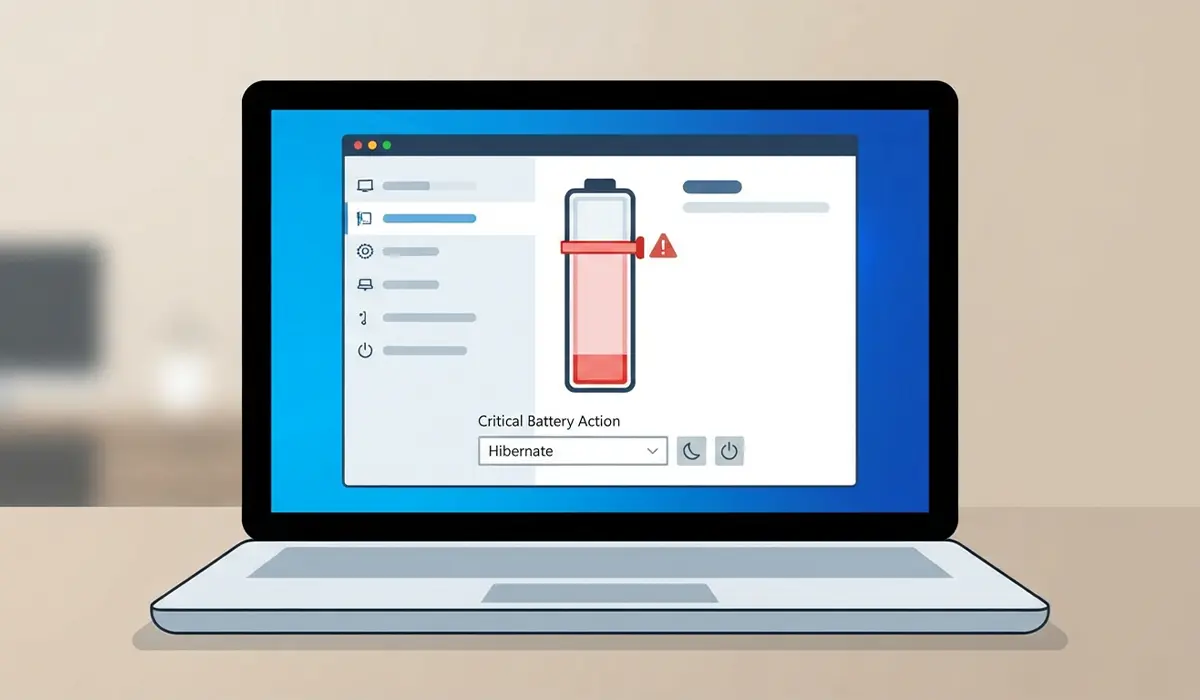
Windows has a setting called the critical battery level, along with an action tied to it such as hibernate or shutdown. On some laptops, especially after a driver update or a factory reset, this threshold gets set higher than the intended 5 to 10 percent, which causes the shutdown to trigger far earlier than expected.
Outdated or Corrupted Battery Drivers
The Microsoft ACPI-compliant control method battery driver is what translates the battery’s raw data into something Windows can act on. When that driver is outdated or has become corrupted, it can misread the battery’s true state and trigger a shutdown prematurely.
Cold Temperatures
Battery chemistry slows down in the cold, which reduces how much current the cells can deliver at any given moment. A laptop used outdoors or in an unheated room in winter may shut off well before it would in a warm office, even with an otherwise healthy battery.
How to Fix a Laptop Turning Off at 20% Battery
Step 1: Run a Battery Health Report
- Step 1: Open Command Prompt or PowerShell as an administrator.
- Step 2: Type powercfg /batteryreport and press enter.
- Step 3: Open the generated HTML file and compare the design capacity against the full charge capacity.
Tip: If the full charge capacity has dropped to well below the design capacity, the battery has genuinely worn down and no software fix will resolve the shutdowns permanently.
Step 2: Adjust the Critical Battery Level Setting
- Step 1: Open Control Panel and go to Power Options.
- Step 2: Select Change plan settings, then Change advanced power settings.
- Step 3: Expand Battery, then Critical battery level, and lower the percentage to a smaller number such as 5 percent for both On battery and Plugged in.
- Step 4: Apply the changes and restart the laptop.
Step 3: Update or Reinstall the Battery Driver
- Step 1: Open Device Manager and expand Batteries.
- Step 2: Right-click Microsoft ACPI-compliant control method battery and select Uninstall device.
- Step 3: Restart the laptop so Windows reinstalls the driver automatically.
Step 4: Recalibrate the Battery
- Step 1: Charge the laptop to 100 percent and let it sit for two hours while plugged in.
- Step 2: Unplug it and let it run down naturally through normal use until it shuts off on its own.
- Step 3: Leave it off for a few hours, then charge it back to 100 percent in one uninterrupted session.
This process helps the battery gauge relearn the true voltage curve of the cells, which often corrects a mismatch between the displayed percentage and the actual charge.
Step 5: Check for BIOS and Chipset Updates
- Step 1: Visit the laptop manufacturer’s support page and search by the exact model number.
- Step 2: Look for a BIOS or embedded controller update, since these often include revised battery and power management logic.
- Step 3: Install any available update following the manufacturer’s instructions exactly.
Step 6: Reduce Load During Low Battery Use
Most people find that closing background apps, lowering screen brightness, and avoiding demanding tasks like video editing or gaming once the battery drops below 30 percent gives an aging battery less of a chance to hit a voltage dip that triggers shutdown.
Step 7: Replace the Battery if It Fails the Health Check
When the battery report in Step 1 shows a significantly reduced full charge capacity, or the laptop still shuts down early after every other fix, a battery replacement is the reliable long-term solution. This works best when the replacement is a genuine or manufacturer-approved part rather than an unverified third-party cell, since mismatched voltage curves can bring the same problem right back. Opening the chassis to replace an internal battery may affect the warranty on some laptops, so check the manufacturer’s policy first, and if the battery is soldered or deeply embedded, having a qualified repair technician handle the replacement is the safer route.
Common Problems and Fixes
- The laptop still shuts down after lowering the critical battery level: The battery itself is likely degraded. Run the battery health report again to confirm reduced capacity.
- The battery percentage jumps around after recalibration: Let the laptop complete one more full discharge and charge cycle without interruption, since a single skipped cycle often leaves the gauge only partially corrected.
- Shutdowns only happen during gaming or video editing: This points to voltage sag under heavy load. Reducing performance settings or plugging in during demanding tasks avoids the issue until the battery is replaced.
- The battery report will not generate: Update the battery driver first, since a corrupted driver can prevent Windows from reading the battery’s data correctly.
Frequently Asked Questions
Why does my laptop shut down at 20% instead of going to 0%?
This typically happens because the battery cannot maintain stable voltage under load at that charge level, or because the critical battery level in Windows is set higher than the default 5 to 10 percent.
Is a laptop shutting down early always a sign of a bad battery?
Not always. Driver issues, an incorrect critical battery setting, or a battery gauge that has drifted out of calibration can all cause the same symptom without the battery being physically damaged.
How do I check my laptop’s battery health in Windows?
Run the built-in battery report by typing powercfg /batteryreport into an administrator Command Prompt, then compare the design capacity to the full charge capacity in the generated file.
Will recalibrating the battery fix random shutdowns?
It often helps when the issue is a mismatch between the displayed percentage and the battery’s real charge. It will not fix shutdowns caused by genuine cell degradation.
Does cold weather make a laptop shut off earlier?
Yes. Lower temperatures reduce how much current a battery can deliver instantly, so a laptop may shut off at a higher percentage in the cold than it would at room temperature.
Can a driver update really cause this problem?
Yes. The battery driver controls how Windows interprets the battery’s data, and a corrupted or outdated version can misread the charge state and trigger an early shutdown.
How much does a laptop battery replacement typically involve?
It depends on the model. Some laptops use an easily accessible battery held by a few screws, while others have the battery glued or soldered in place and are better handled by a professional.
Does replacing the battery void the warranty?
It depends on the manufacturer and whether the laptop is still within its warranty period. Checking the manufacturer’s policy before opening the case is the safest first step.
Should I keep using a laptop that shuts off at 20%?
It is usable in the short term if power settings are adjusted, but a battery that consistently shuts down early is generally past the point of reliable use and should be replaced.
Can a bad charger cause a laptop to shut off early?
A charger that delivers inconsistent power can contribute to voltage instability, but this symptom is far more commonly tied to the battery’s internal condition than to the charger itself.
